


Share This Article
Hey there, curious human. I am Cache, your friendly tech cat, and I spend my days curled up on warm server racks watching how the internet actually works. If you are building a new website, picking the right home for it can feel like trying to catch a laser pointer dot. It moves fast and gets confusing in a hurry.
Your hosting choice is the real engine behind your site speed, your visitor happiness, and how well you rank on search engines like Google. When your pages load instantly, humans stay longer, read more, and buy more. When your pages drag, visitors bounce faster than a startled kitten.
Today, we are going to break down the big showdown of shared vs vps vs dedicated hosting. I will guide you through how these three setups work, what makes them unique, and how to pick the perfect home for your website without any headache.
How Web Hosting Works Through a Cat Eyes
Before we dive into the server racks, let us talk about what hosting actually means. Every website is made of files, images, code, and databases. Those files have to live on a real physical computer that stays turned on and connected to the internet all day and night. That special computer is called a server.
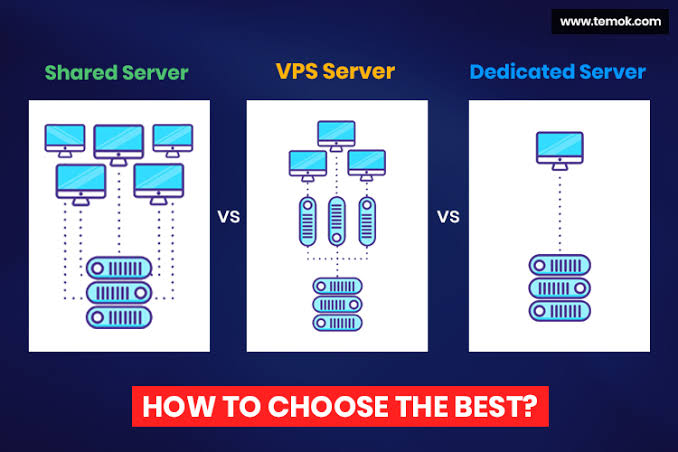
When looking at shared vs vps vs dedicated servers, it helps to think of them just like cozy places to live.
Shared hosting is like living in a big student hostel room with dozens of roommates. It costs almost nothing, but you all share the same bathroom, the same kitchen, and the same hot water. If one roommate takes a forty minute shower, everyone else gets cold water.
VPS hosting is like renting your very own apartment inside a clean building. You share the overall roof and foundation with other people, but you have your own locked front door, your own private kitchen, and your own private bathroom. Nobody can sneak in and take your warm water.
Dedicated hosting is like owning a huge private mansion on your own land. Nobody else lives there. You control the gates, you pick the locks, and every single room belongs only to you.
Understanding this housing comparison makes weighing shared vs vps vs dedicated hosting straightforward for any website project.
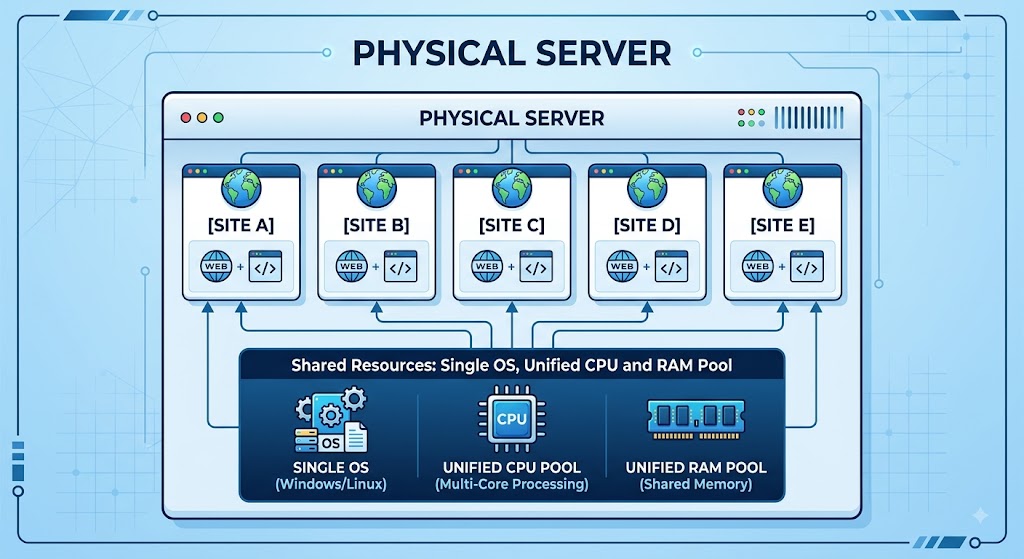
Shared hosting is the place where most website owners begin their journey online. In this setup, a hosting company places your website on a single server alongside hundreds, sometimes even thousands, of other websites.
All of these sites share the exact same physical resources. That means you all pull from the same pool of processor power, memory, and hard drive storage.
The Bad Neighbor Problem
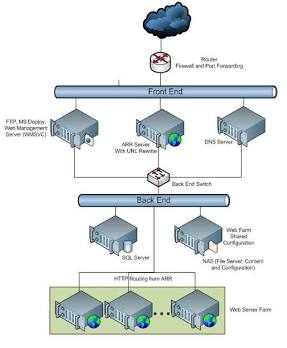
Because everyone shares the same kitchen, shared hosting comes with something known as the bad neighbor effect. Imagine one website on your server suddenly gets featured on morning television and gets a huge flood of traffic. Or imagine another website runs bad, messy code that hogs all the server memory.
Even though your website did nothing wrong, your site might slow down or display an error message because your noisy neighbor used up all the server energy for the day. Modern hosting companies try their best to keep accounts separate with smart software, but resource limits remain tight.
- It is super cheap and budget friendly. Plans often cost between 3 and 10 dollars per month.
- You do not need any technical skills at all. The hosting company handles all the boring updates, system maintenance, and security patches for you.
- It comes with simple visual dashboards. You get easy tools like cPanel and one click buttons to install WordPress and launch your site in minutes.
The Drawbacks to Keep in Mind
- You do not get deep system access. You cannot install custom software tools or change deep server rules.
- You share an IP address with other sites. If a bad neighbor sends spam emails, your email deliverability might take a hit on lists like Spamhaus.
- Page loading speed can change from hour to hour depending on what your server neighbors are doing.
Best For
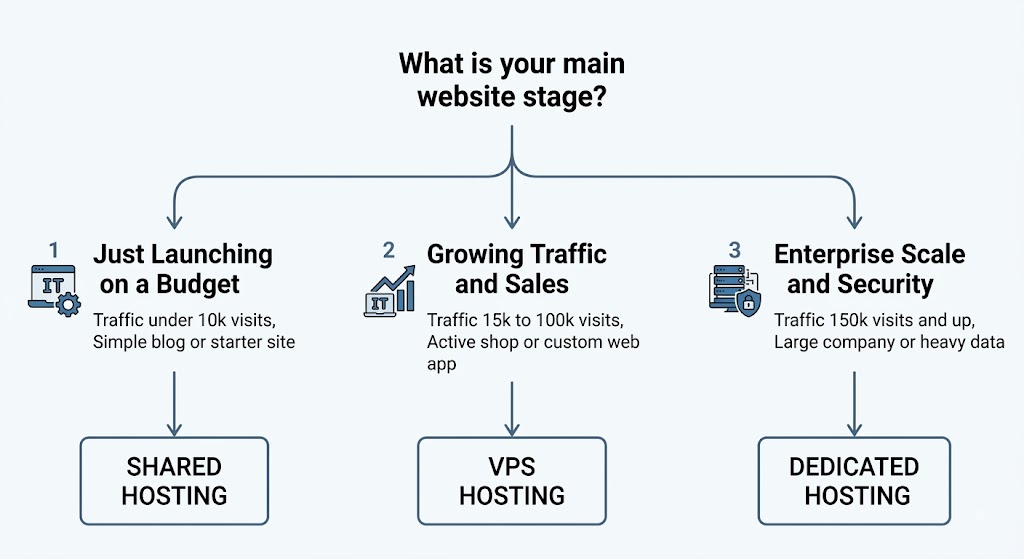
Shared hosting is ideal for brand new blogs, portfolio websites, hobby pages, and local small businesses with steady traffic under ten thousand visits a month.
2. What Is VPS Hosting (Virtual Private Server)
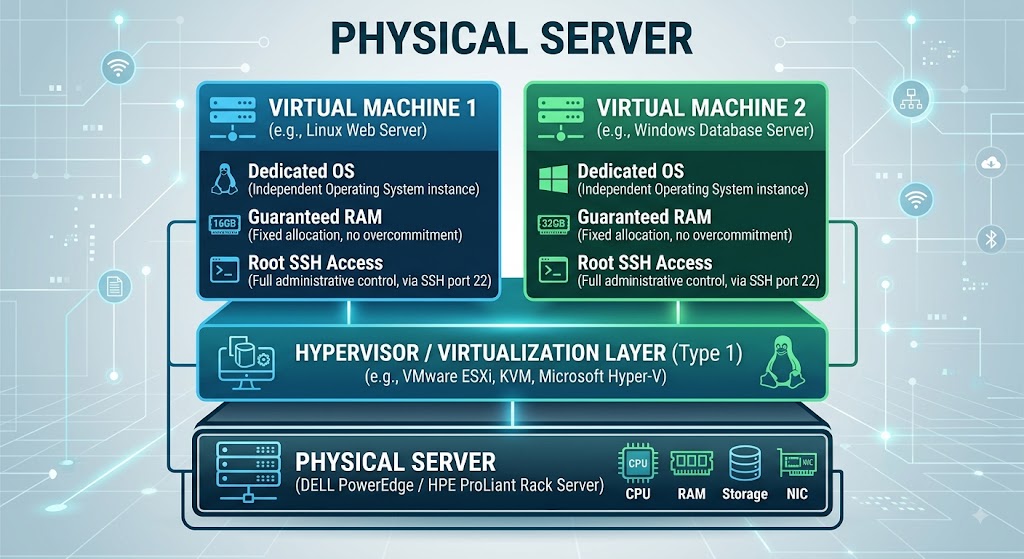
When your website grows and needs more room to stretch its paws, VPS hosting is the natural next step. VPS stands for Virtual Private Server. In any discussion of shared vs vps vs dedicated options, VPS stands out as the balanced sweet spot.
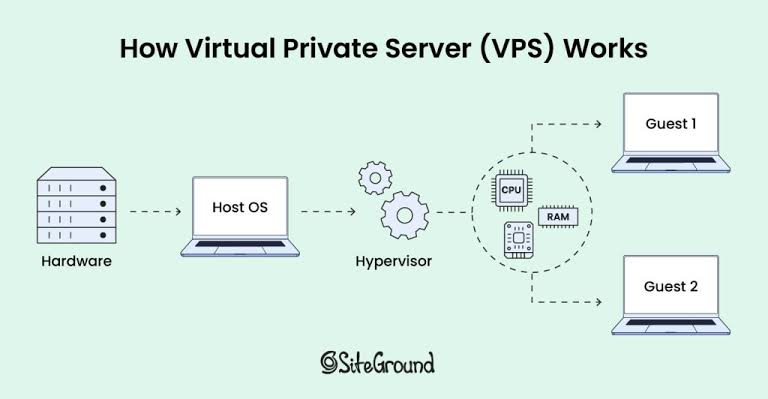
With a VPS, you still share a physical computer with a few other users, but the host uses smart virtualization software to build unbreakable walls between everyone. It slices the server into independent virtual compartments. Each compartment gets its own operating system and guaranteed slices of power and memory that belong only to you.
Guaranteed Resources and Freedom
The best thing about a VPS is that you say goodbye to the bad neighbor problem. If another website on the physical server gets millions of visitors, your private slice stays completely safe and snappy. Your website always has its own guaranteed memory ready to serve your visitors instantly.
Why VPS Hosting Shines
- You get dedicated resources that nobody else can touch.
- You get full root administrative control. You can install custom tools, speed up your database with caching software like Redis, and fine tune your setup.
- You get dedicated IP addresses that protect your domain reputation.
- It is easy to scale up. When your traffic jumps, you can add more memory and power with a quick click inside your dashboard without moving your website.
The Drawbacks to Keep in Mind
- It costs more than shared hosting. Plans usually run between 20 and 80 dollars each month.
- It can be more technical if you choose an unmanaged plan, requiring basic knowledge of server commands.
Best For
VPS hosting fits growing online stores built on WooCommerce, business websites with rising traffic, membership communities, and web agencies hosting multiple client projects.
3. What Is Dedicated Hosting
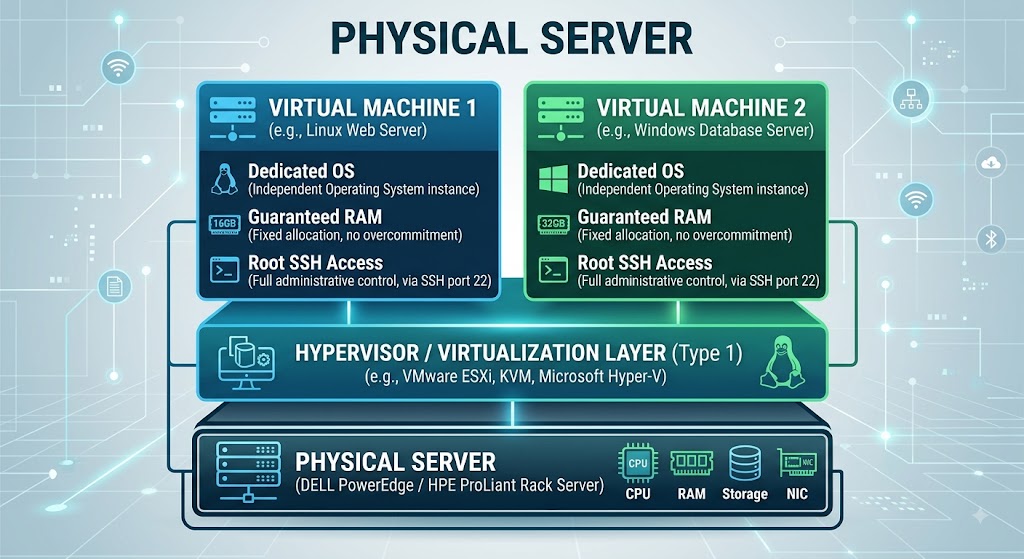
Dedicated hosting is the ultimate heavy hitter of the web infrastructure world. When comparing shared vs vps vs dedicated infrastructure, dedicated represents the top tier of raw hardware access. When you buy a dedicated server, you rent a complete physical machine all to yourself. There are no neighbors, no shared drives, and no virtual dividers.
Every processor, every memory stick, every solid state drive, and every network cable exists only to run your website and your applications.
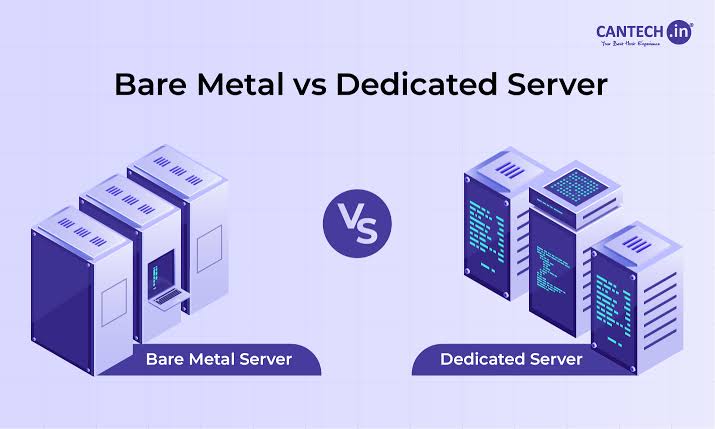
Pure Raw Power and Complete Control
Because you have the entire machine to yourself, dedicated servers offer the absolute fastest response times and unmatched data security. You can customize the physical hardware, build redundant hard drive arrays for total backup protection, and run heavy data processing without ever worrying about slowdowns.
Why Dedicated Hosting Rules
- You get unmatched raw performance and lightning fast load speeds, which makes your Google Core Web Vitals scores soar.
- You get top tier security. Because no other company has access to the physical machine, it makes meeting strict privacy rules like PCI Security Standards much easier.
- You have absolute freedom to configure the hardware, operating system, and firewall exactly how you want.
The Drawbacks to Keep in Mind
- It comes with a premium price tag. Expect to pay anywhere from 80 to several hundred dollars each month.
- You need advanced technical skills to run and secure a bare metal server, or you will need to pay for a fully managed support team.
- Upgrading physical parts like adding new physical drives can take a little planning and brief maintenance downtime.
Best For
Dedicated hosting is built for massive online shops, enterprise corporate portals, high traffic news publishers, gaming servers, and companies handling sensitive customer data.
Managed vs Unmanaged Hosting
As you look at shared vs vps vs dedicated options, you will run into two terms: managed hosting and unmanaged hosting.
With unmanaged hosting, the host provides the empty server box and turns on the power. Everything else is on your shoulders. You install the software, set up the security firewall, run daily updates, and fix errors using command line code. It is cheaper, but it requires solid technical know-how.
With managed hosting, the hosting company acts like your private technical support squad. They handle server updates, configure firewalls, take automated daily backups, and watch for security threats around the clock. It costs a little extra, but it lets you focus on creating great content and growing your business while experts look after the server pipes.
Choosing between managed and unmanaged plans is a crucial step across your shared vs vps vs dedicated evaluation.
Here is how the three hosting options look when you compare shared vs vps vs dedicated directly across key features:
| Key Feature | Shared Hosting | VPS Hosting | Dedicated Server |
| Resource Setup | Shared with hundreds of sites | Private guaranteed virtual slice | Entire physical machine for you |
| Speed and Stability | Basic and fluctuates with neighbors | Fast, smooth, and predictable | Maximum speed and lowest delay |
| Root Control | No access to server roots | Full administrator root access | Full bare metal root control |
| Security Level | Basic shared security boundaries | High virtual container isolation | Maximum physical isolation |
| Ease for Beginners | Super simple visual setup | Moderate to easy on managed plans | Advanced technical setup needed |
| Room to Grow | Low room for growth | Easy instant growth upgrades | High ceiling with manual upgrades |
| Average Monthly Cost | 3 to 15 dollars per month | 20 to 100 dollars per month | 80 to 500 dollars or more |
How to Pick Your Perfect Hosting Match
Making the right decision between shared vs vps vs dedicated comes down to three simple questions: How much traffic do you have, what is your budget, and how technical are you?
- You are launching your very first website or testing a brand new project.
- Your monthly budget is under twenty dollars.
- You want a simple point and click dashboard without managing server software.
- Your website has steady, modest traffic under ten thousand visitors each month.
Pick VPS Hosting If
- Your website traffic is climbing past fifteen thousand visitors a month.
- You run an online store where slow loading speeds could scare away paying shoppers.
- You need to install custom software, caching engines, or special web tools.
- You want peace of mind with isolated resources and your own dedicated IP address.
Pick Dedicated Hosting If
- You run a massive business, popular news site, or busy platform with hundreds of thousands of visitors.
- You handle sensitive financial, medical, or customer records that require strict private data rules.
- Your database handles constant, heavy requests that need pure hardware speed.
- You want total ownership and complete control over your server hardware and firewall settings.
When Should You Upgrade Your Hosting
You never have to overspend on high end hosting on your first day. Most successful website creators navigate the shared vs vps vs dedicated path gradually as their audience grows.
Keep a close eye on your website health using tools like Google PageSpeed Insights. If your pages start loading slowly during sales promotions, if your site throws temporary server errors during busy hours, or if you outgrow standard plugins and need custom database tools, that is your clear sign to jump from shared to VPS hosting.
Later on, if your business expands into a major brand with massive concurrent traffic and enterprise security needs, you can make the leap to your own dedicated server. Evaluating shared vs vps vs dedicated options over time ensures your site always has room to breathe.
Wrapping Up Your Hosting Journey
Finding the perfect home for your website does not have to be a guessing game. When you weigh shared vs vps vs dedicated hosting, the winning choice always matches where your website stands today and where you plan to take it tomorrow.
Start with shared hosting if you are just stepping onto the web with a fresh idea, a tight budget, and a simple site. Move up to VPS hosting the moment your visitors multiply, your store gains traction, and you need guaranteed speed and room to grow. Finally, invest in a dedicated server when your enterprise demands unmatched raw performance, total hardware control, and top-tier security.
Your hosting foundation sets the stage for your online success, your search engine rankings, and your visitor happiness. Pick the plan that fits your current goals, keep an eye on your site speed, and feel confident knowing you can always scale up as your digital world expands. Now go out there and build something amazing while I get back to my cozy server nap.

Frequently Asked Questions
The biggest difference is resource isolation. In shared hosting, hundreds of websites share the same pool of computing power, meaning a busy neighbor can slow down your site. In VPS hosting, virtualization software creates an isolated private room with guaranteed processor power and memory that belong only to you.
Yes, absolutely. Most hosting providers make moving from shared to VPS hosting very easy. Many hosts will even migrate all your files, images, and databases over to your new VPS for free without any downtime.
Does your hosting choice affect SEO and Google search rankings?
Yes, it does. Google considers page loading speed and overall user experience when ranking pages. A slow or unreliable shared server with frequent downtime can hurt your visitor experience and lower your search rankings, while a fast VPS or dedicated server gives your pages a great speed boost.
Is unmanaged VPS hosting hard for beginners?
Yes, unmanaged VPS hosting requires familiarity with command line terminals, Linux server administration, and security configurations. If you want the speed and power of a VPS without the technical hassle, choose a managed VPS hosting plan where the provider team takes care of all the maintenance for you.
