


Share This Article
Hello there, my lovely human friend! I am Cache, your curious tech girl cat, and I am so excited to welcome you to my cozy corner of the internet. Today, I am curling up right next to your keyboard to help you master a skill that will completely transform how you interact with artificial intelligence.
Have you ever sat down in front of a computer, typed a quick message to an AI tool like ChatGPT, and ended up with a response that was totally off the mark? I see humans do this all the time, and I can tell how frustrating it gets. You ask for a quick summary or a fun idea, and the machine gives you a long, boring wall of text that sounds like a cold robot wrote it.
Well, I have a little secret for you. The machine is not broken, and you do not need to be a software genius to fix the problem. You just need a gentle introduction to prompt engineering 101.
In this comprehensive guide, I am going to walk you through everything you need to know about talking to artificial intelligence. I promise to keep things super simple, easy to read, and completely stress free. By the time we finish our chat, you will know exactly how to give clear instructions that deliver amazing results every single time you chat with a machine.

What is Prompt Engineering 101 and Why Should You Care?
Let us start right at the beginning. Before we jump into fancy tricks, we need to understand what a prompt actually is.
When you sit down to use an artificial intelligence program, a prompt is simply the group of words you type into the box. It is your instruction, your question, or your request. If you type “write a story about a cat,” that short sentence is your prompt.
Now, what is prompt engineering 101? Engineering might sound like a huge, scary word that involves hard math and endless lines of code, but I promise you it is not. In simple terms, prompt engineering is just the art of writing clear, thoughtful instructions so that the computer knows exactly what you want.
Think of it this way. Imagine you want me, Cache the cat, to fetch a shiny red ball. If you just wave your hand vaguely toward the garden and whisper the word “ball,” I might just tilt my head, blink at you, and go back to my catnap. But if you hold up the red ball, point to it clearly, and use a bright tone, I know right away what game we are playing.
Artificial intelligence tools work in a very similar way. When you give them vague instructions, they have to guess what you mean. And trust me, computers are bad at guessing human thoughts! When you practice prompt engineering 101, you remove all the guessing game confusion. You give the machine clear directions, plenty of context, and helpful rules so it gives you the exact answer you need on your very first try.
Learning this skill saves you so much time. Instead of spending an hour retyping your questions and getting annoyed at your screen, you can get high quality answers in just a few seconds.
The Big Secret Behind How Artificial Intelligence Thinks
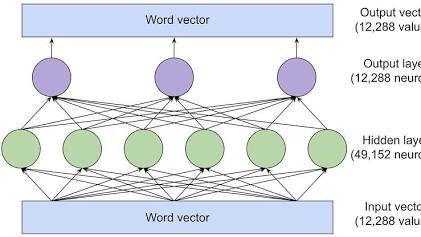
To get great outputs from any technology, it really helps to understand a little bit about what is going on under the hood. Do not worry, I will keep this super simple!
Artificial intelligence tools like ChatGPT, Claude, or Google Gemini are powered by something called Large Language Models. These models have read vast amounts of books, websites, articles, and conversations created by humans over many years. Because they have seen so many patterns of words, they are amazing at predicting which word should come next in a sentence.
However, these models do not have feelings, and they do not know who you are unless you tell them. They do not know if you are a busy teacher, a student writing an essay, a small business owner, or a beginner who just wants a quick explanation.
When you give an AI tool a tiny prompt like “explain photosynthesis,” the computer searches through its massive memory for everything it knows about that topic. Because you did not give it any rules, it might give you a giant textbook chapter filled with hard scientific terms.
On the other hand, if you apply the core principles of prompt engineering 101, you might write something like “explain photosynthesis in three simple sentences for an eight year old child.” Now, the machine knows to skip the complex textbook language and pick soft, simple words that a young student can enjoy.
The machine is not getting smarter in that second. You are simply giving it better directions. You are turning on a bright flashlight in a dark room so the machine knows which path to take.
What Are AI Hallucinations and How Can Prompt Engineering Fix Them?

Have you ever asked an artificial intelligence tool a question, and it gave you an answer that sounded super confident, super professional, but was completely made up? In the tech world, we call this an AI hallucination.
Just like a sleepy kitten dreaming about flying fish, an AI model can sometimes “dream up” facts, fake quotes, or nonexistent website links when it does not know the true answer.

Why Does Artificial Intelligence Hallucinate?
Large Language Models are trained to predict the next word in a sentence based on statistical patterns. They do not have a human brain, and they do not actually “know” facts the way you and I do.
When you ask an AI tool a vague question or give it very little context, it feels “pressure” to give you an answer anyway. Instead of saying “I am not sure,” it uses its statistical pattern engine to invent something that sounds reasonable.
How to Stop AI Hallucinations Using Prompt Engineering 101
The good news is that you do not have to settle for made-up facts! You can use simple prompt engineering 101 guardrails to keep your AI accurate and grounded in reality. Here are three purr-fect tricks to prevent hallucinations:
- Give the AI Permission to Say “I Don’t Know”:Add this simple rule to your negative constraints: “If you do not have verified facts for this question, respond with ‘I do not have enough information’ instead of guessing.” This gives the machine an easy exit route so it does not make things up.
- Ground the Response in Your Own Source Text:Instead of asking the AI to search its massive general memory, paste your background text or document directly into the prompt and say: “Answer the following question using ONLY the provided text below.”
- Use the Chain of Thought Technique:Ask the AI to “think step by step and verify each statement before writing the final output.” Forcing the AI to slow down and show its reasoning reduces logical errors drastically.
The 6 Steps to Build a Purr-fect God Level Prompt
Now that you know why clear instructions matter, I want to share my favorite framework for crafting incredible prompts. I like to call this the God Level Prompt framework. Whenever I want to help my human friends get optimal work out of an AI tool, I tell them to include six key ingredients in their message.
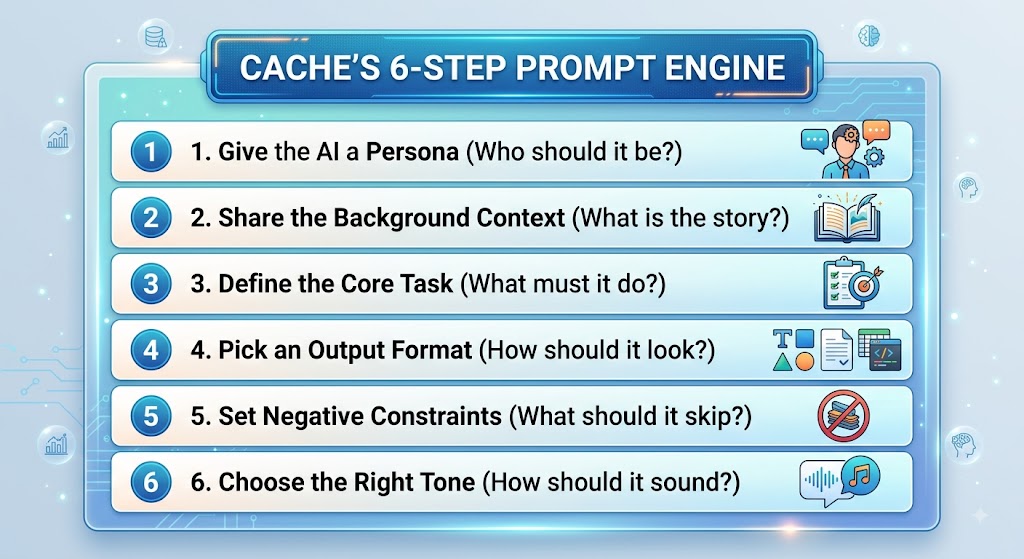
Let us break down each of these six steps together so you can see how easy they are to use!
Step 1: Assign a Role or Persona
First, tell the machine who it should pretend to be. When you give the AI a role, you help it narrow down its vocabulary and focus on a specific area of knowledge.
For instance, you can tell the machine to act like a friendly school teacher, a professional fitness coach, an expert travel guide, or a creative copywriter.
When the machine assumes a persona, its tone and information automatically match that job. A travel guide will talk about fun local spots, while a financial advisor will focus on budget numbers and safety.
Next, tell the AI a little bit about your situation. Who are you? Who is your target audience? Why are you asking for this information today?
If you are writing an email to invite friends to a party, tell the machine what kind of party it is, where it is happening, and whether the mood is formal or casual. The more relevant details you share, the less the machine has to guess.
Step 3: State the Task Clearly
This is the main action step. Tell the machine exactly what you want it to produce right now.
Try to use strong action words. Words like summarize, draft, list, brainstorm, rewrite, or analyze work wonderfully well. Be direct so there is no confusion about what the final goal is.
Step 4: Choose the Format
How do you want your answer to look on your screen? Do you want a long detailed essay, or would you prefer short bullet points? Do you want a clean table with rows and columns, or a simple three paragraph letter?
If you do not specify a format, the AI will usually default to long paragraphs of text. If you prefer quick lists that you can scan in two seconds, just ask for bullet points!
Step 5: Add Negative Rules
Setting negative rules is one of my absolute favorite tricks in prompt engineering 101. A negative rule simply tells the machine what it should avoid doing.
For example, you can tell the AI to avoid using hard jargon, avoid using corporate buzzwords, skip using emojis, or keep the response under two hundred words. By telling the computer what NOT to do, you eliminate fluff and protect your output from common robotic mistakes.
Step 6: Pick the Tone of Voice
Finally, decide how you want the message to sound when you read it out loud.
Should the text sound warm and friendly, strict and professional, witty and casual, or soft and comforting? Explicitly naming the tone helps the machine select the perfect adjectives and sentence structures for your project.
Comparing a Basic Prompt with an Engineered Prompt
To show you how powerful this framework really is, let us look at a real example side by side.
Imagine you want to write a friendly welcome note for new visitors coming to a local pet adoption shop.
The Weak Way
Your Prompt:
“Write a welcome note for a pet adoption shop.”
When you send a tiny prompt like this, the machine generates a generic, boring response filled with clichés. It might sound stiff, long, and totally uninspiring. You end up having to fix half the sentences yourself!
The Smart Cache Way
Your Prompt:
Persona: Act as a warm and welcoming mascot for a local pet adoption center.
Context: We are opening our doors to families looking to adopt rescue cats and dogs this weekend. Many visitors might be adopting a pet for the very first time.
Task: Write a cute welcome letter to greet families as they walk through the front door.
Format: Write three short paragraphs. Use bullet points in the middle paragraph to highlight three simple tips for new pet owners.
Negative Rules: Do not use sad language, do not make it sound overly corporate, and do not exceed two hundred words.
Tone: Cheerful, gentle, and enthusiastic.
When you hit enter on this second prompt, the machine delivers a beautiful, heartwarming welcome note that hits every single requirement. You do not have to waste a single minute editing out weird words or fixing formatting issues. That is the magic of prompt engineering 101 in action!
The Bright Side and the Tricky Bits: Pros and Cons of Prompt Engineering
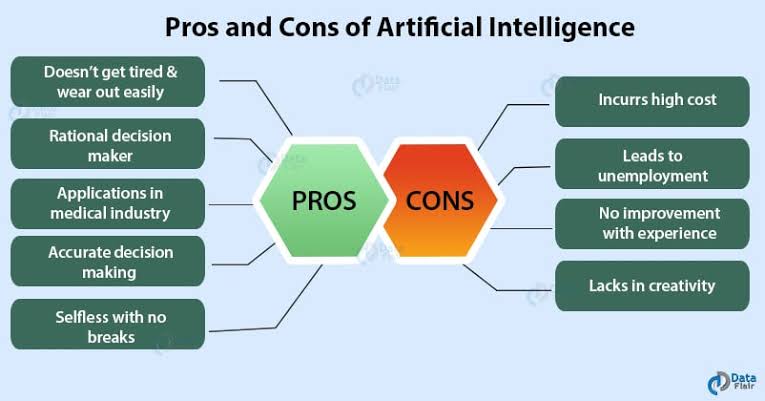
Before you dive headfirst into crafting prompts all day, I want to be completely honest with you. Just like having a pet cat comes with endless cuddles (a huge pro!) and the occasional hairball on the rug (a minor con!), learning prompt engineering 101 has its own mix of amazing benefits and small challenges.
Let us look at both sides so you know exactly what to expect!
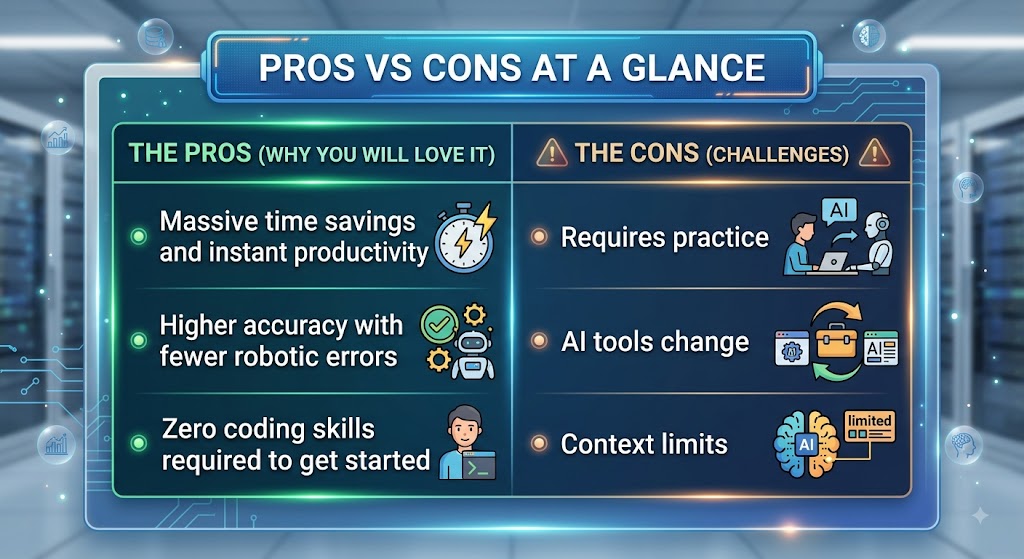
The Pros: Why You Should Master This Skill
- Unlocks Massive Time Savings: Once you have a solid prompt template, you can turn a task that usually takes two hours into a two minute job.
- Delivers Predictable, High-Quality Work: By setting clear personas, negative rules, and output formats, you eliminate vague, robotic text and get tailored answers right away.
- Requires Zero Technical Background: You do not need to learn complex programming languages or advanced math. If you can write clear, everyday sentences, you can master prompting!
- Scales Across Everyday Life: You can use the exact same prompting techniques whether you are writing business emails, organizing a weekly dinner plan, or learning a new subject.
The Cons: Tricky Things to Keep in Mind
- There is a Small Learning Curve: You will not get a “God Level Prompt” right on your first try every single time. It takes a little trial, error, and patience to refine your instructions.
- AI Models Keep Changing: Tools like ChatGPT, Google Gemini, and Claude update frequently. A prompt that worked perfectly last month might need a quick tweak next month.
- Context Windows Have Boundaries: AI tools can only remember a certain amount of information in a single conversation before they start forgetting earlier details.
Real World Ways You Can Use Prompt Engineering Every Day

You might be thinking that prompt engineering is only useful for people who build software or work in tech companies. But that is not true at all! Everyday humans can use these simple prompting techniques to make their lives so much easier.
Here are just a few fun ways you can put these tips to work starting today.
| Daily Activity | How Good Prompts Help You |
| Cooking at Home | List the random veggies sitting in your fridge and ask the AI to generate a quick, healthy recipe. |
| Learning New Things | Ask the AI to explain tricky topics like personal taxes or quantum physics in simple terms. |
| Planning Vacations | Request a custom three day travel schedule for your dream city that fits your exact personal budget. |
| Writing Emails | Draft polite messages to landlords, service providers, or co-workers without stressing over word choices. |
| Fitness Goals | Create a simple weekly home workout plan that matches your current energy level and equipment. |
As you can see, knowing how to talk to artificial intelligence gives you a personal assistant for almost any task on your to-do list!
Simple Techniques to Make Your AI Conversations Even Better
Now that you know the six basic steps of prompt engineering 101, I want to teach you three extra secret moves that will make your prompts work even better. These are simple tricks that professional prompt engineers use every day, and they are super easy to learn!
1. The Few Shot Prompting Method
Sometimes, explaining what you want with words alone can be tricky. That is where Few Shot Prompting comes in handy.
Few Shot Prompting simply means giving the machine one or two clear examples of what you want before asking it to do the work.
For instance, if you want the machine to turn long book titles into short, catchy social media headlines, you can show it an example first. You can write:
Example Input: “A Detailed Guide to Caring for Senior Cats in the Winter Season”
Example Output: “Keep Your Senior Cat Cozy This Winter!”
Now do this one for me: “A Complete Breakdown of Proper Nutrition for Growing Kittens”
By showing the computer a completed example, it instantly gets the pattern! It copies the style of your example and gives you an output that matches your expectations perfectly.
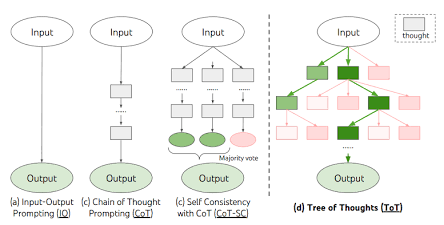
2. The Chain of Thought Method
Have you ever asked an AI tool to solve a math problem or a logical riddle, only to watch it give you the completely wrong answer? That happens because artificial intelligence tools try to generate the final answer too quickly without walking through the steps first.
To fix this, you can use a technique called Chain of Thought prompting. All you have to do is add a simple instruction at the end of your message:
“Please think through this step by step before giving me the final answer.”
When you tell the AI to break down its thoughts step by step, it processes the problem logically, double checks its own work, and avoids silly mistakes. It is like asking a student to show their work on scratch paper during an exam!
3. Iterative Refinement and Chops
Please remember that you do not have to get everything perfect on your very first try! Talking to an AI tool should feel like a cozy conversation, not a high pressure test.
If the machine gives you a response that is almost right, but not quite perfect, do not start over from scratch. Just talk back to it like a friend! You can type simple follow up notes such as:
- “That was great, but can you make the second paragraph a little shorter?”
- “Thank you! Now rewrite this same note using a slightly more casual tone.”
- “Can you replace those complex words with simpler alternatives that anyone can understand?”
Working together in small steps is one of the best ways to polish your work until it sparkles.
Busting Popular Myths About Prompt Engineering
Because artificial intelligence is evolving so quickly, there are plenty of silly rumors and myths floating around out there. As your faithful mascot, I want to clear up a few of these misunderstandings so you can approach prompt engineering 101 with complete confidence!
Myth 1: You Need to Know How to Code
This is probably the biggest myth of all! Many people assume that prompt engineering requires deep computer programming skills, Python knowledge, or complex math degrees.
The truth is that prompt engineering is mostly about clear human communication. If you know how to speak clearly, organize your thoughts, and give polite directions, you already have all the core skills you need. Clear language is the new coding language!
Myth 2: You Have to Use Fancy Secret Words
Some people believe there are secret magic words that unlock hidden powers inside ChatGPT or Gemini. They think if they buy a cheat sheet with thousands of prompts, they will magically master the tool overnight.
While having template ideas is fun, there are no secret magic spells. The best prompts are simply clear, well structured English sentences that share good context and simple boundaries. You do not need to buy expensive lists of prompts when you can easily create your own using my six step method!
Myth 3: AI Will Take Over Everything Soon
It is easy to feel intimidated by fast moving technology, but artificial intelligence is ultimately just a tool created to assist human creativity, not replace it.
An AI tool cannot feel true empathy, it does not have personal life memories, and it cannot replace human intuition. It needs your unique voice, your direction, and your critical eye to produce work that truly touches hearts. Mastering prompt engineering 101 is simply the bridge that connects your creative human vision with the processing speed of the machine.
Do You Want to Become a Professional Prompt Engineer?
As artificial intelligence continues to grow across every industry, many businesses are looking for talented people who specialize in crafting high quality prompts. People who master this skill are often called Prompt Engineers!
If you find yourself loving this process and want to take your skills further, here are a few things that professional prompt engineers focus on:
- Testing and Evaluation: Trying out the same prompt across different AI models like ChatGPT, Claude, Llama, and Gemini to see which model gives the best results.
- Building Prompt Libraries: Creating re-usable templates for entire company teams so that marketing, customer support, and sales departments can all work faster.
- Understanding System Settings: Learning about behind the scenes settings like Temperature and Top P, which control how creative or predictable the machine’s answers will be.
- Automating Workflows: Connecting prompts together using smart software tools so that complex tasks can run automatically in the background.
Whether you want to pursue a brand new career in technology or simply want to finish your daily work tasks twice as fast, practicing prompt engineering 101 is one of the best investments you can make in yourself today!
Free Resources to Keep Learning with Cache
I am so proud of you for sitting down with me today and learning all these wonderful new ideas! Learning new tech skills should always feel fun, cozy, and rewarding.
If you want to keep exploring the world of artificial intelligence and prompt engineering, here are a few fantastic free resources that you can check out on your journey:
- OpenAI Prompt Engineering Guide: Official documentation provided directly by the creators of ChatGPT, filled with simple tips and beginner examples.
- DAIR.AI Prompt Engineering Guide: A completely free, open source website that walks you through basic, intermediate, and advanced prompting methods step by step.
- Google Cloud Prompting Guide: Clear guidelines and tactics directly from Google on how to structure inputs for Generative AI models.
Final Words from Your Cache
We have covered so much ground together today! From understanding how large language models think to mastering my favorite six step prompt framework, you now have all the tools you need to talk to AI with total ease.
The next time you open up an artificial intelligence tool, take a slow breath, remember my six simple steps, and give the computer clear, thoughtful instructions. You will be amazed at how smart, accurate, and helpful the responses become when you put prompt engineering 101 into practice!
Thank you so much for hanging out with me today! Keep experimenting, stay curious, and enjoy your brand new AI powers.
Frequently Asked Questions About Prompt Engineering 101
Cache here again! To make sure you have answers to all those curious questions popping up in your mind, I have put together a helpful FAQ list. Here are the most common questions humans ask about prompt engineering 101!
What is prompt engineering 101 in simple terms?
Prompt engineering 101 is the process of learning how to write clear, structured, and specific instructions for artificial intelligence tools like ChatGPT, Claude, or Google Gemini. Instead of giving vague queries, you provide context, personas, formatting choices, and rules so the AI gives you accurate, high-quality answers right away.
Do I need to learn how to code to do prompt engineering?
No, not at all! Basic prompt engineering requires zero programming skills. It relies on clear human communication, logical thinking, and good written language. While technical prompt engineers in software roles might use Python to connect AI APIs, everyday prompting is simply about writing better English sentences.
What is the difference between zero-shot and few-shot prompting?
Zero-Shot Prompting: You ask the AI to complete a task without giving it any prior examples (e.g., “Summarize this article”).
Few-Shot Prompting: You show the AI one or two completed examples before asking it to perform the task (e.g., “Here are two examples of catchy blog titles; now write one for my new topic”). Few-shot prompting helps the AI match your exact style.
What is Chain-of-Thought prompting?
Chain-of-Thought prompting is a simple technique where you explicitly ask the AI to “think step by step” before delivering a final answer. This is especially helpful for complex logic problems, math calculations, or multi-step analysis because it forces the model to double-check its reasoning.
Why does AI sometimes give completely wrong answers (hallucinations)?
AI models are predicting the next most likely words based on patterns in their training data, rather than “thinking” like a human. When context is missing or instructions are vague, the AI fills in the gaps by guessing, which can lead to made-up facts. You can reduce hallucinations in prompt engineering 101 by providing clear source text, setting negative constraints, and telling the AI to say “I don’t know” if it lacks the facts.
What are negative prompts or negative constraints?
Negative prompts are rules telling the AI what not to do. For example, telling the machine “do not use corporate jargon,” “do not exceed 150 words,” or “avoid using emojis” keeps the final output clean, relevant, and fluff-free.
Which AI tool is best for practicing prompt engineering?
All major Large Language Models respond wonderfully to good prompt engineering! You can practice your skills on free tools like OpenAI’s ChatGPT, Google Gemini, Anthropic’s Claude, or Microsoft Copilot. The six-step framework taught in this guide works across all of them.


1 Comment