

Share This Article
Hey there! Cache here, your friendly guide to making tech simple and stress-free.
Remember when VPNs were just boring tools for computer nerds and office IT teams? Times have definitely changed, and nowadays almost everyone seems to have one installed. Millions of people switch on a VPN every day to keep their private information safe on open coffee shop Wi-Fi networks. Others use them to unlock extra shows on Netflix or to stop their Internet Service Provider from keeping tabs on the websites they visit.
Because these tools are growing so fast, different countries are handling them in very different ways. In most democratic nations, figuring out where VPNs are legal is easy because you can use them freely without worrying about breaking any laws. But in other parts of the world, governments enforce strict rules. They might force providers to save your private data, block unapproved connections, or ban VPNs completely, leaving users facing big fines or serious legal trouble.
That is why I created this simple guide for you. I will walk you through how a VPN works behind the scenes, the basic security features you should always look for, the sneaky traps inside free VPN apps, and a complete breakdown showing you where VPNs are legal, restricted, or banned around the world. Let us jump right in together and get you up to speed.
What Is a VPN and How Does It Work?
Think of a VPN, or Virtual Private Network, as a secure digital highway created just for you. It builds a protected path between your personal device, like your phone or laptop, and a remote server run by the VPN service.
When you surf the web without a VPN, your online data travels directly through your Internet Service Provider. It is just like sending a postcard through the mail, where anyone along the line can read your message. This lets your provider see every single website you open and track the exact time you visit them. In plenty of regions, companies can even legally sell this activity history to advertising groups.
The moment you switch your VPN on, two big changes happen right away.
First, it changes your online location. Your real address on the web is hidden behind the address of the remote server. It works like sending a letter with a friend’s return address instead of your own, making it look like you are browsing from somewhere else entirely.
Second, it protects your actual data. Every piece of information traveling to and from your phone or computer is scrambled into a secret code that no one else can read, similar to locking your letter inside an unbreakable safe before shipping it out.

When learning about where VPNs are legal, it helps to remember how this simple process works. By using a secure tunnel to connect to the internet, you simply choose to trust your VPN service instead of your local internet provider.
Understanding Encryption: The Core Safeguard
Encryption is really just a clever way of locking up your information so nobody else can read it. It takes your normal words and turns them into a scrambled secret code that only a matching digital key can unlock.
To understand how this keeps you safe, it helps to compare everyday web security with full VPN protection.
When you look at a website address and see HTTPS, that acts like a secure lock for just that single web page. It works like sending a sealed envelope through the mail. It keeps private details like your bank passwords or credit card numbers safe while you are on that site, but your internet service provider can still see the company name written on the outside of the envelope.
A VPN takes security a huge step further. Instead of protecting just one page in your browser, it locks down all internet traffic leaving your device. That includes your social media apps, background system updates, and online games. It scrambles everything using top grade encryption tools like AES 256 or ChaCha20, which are practically impossible for anyone to crack.
Because this level of privacy is so strong, many people around the world check where VPNs are legal so they can keep all their device data protected without breaking any local rules.
Core Technical Concepts: Protocols & Architecture
Not all VPN connections work the same way. Think of the protocol as the engine under the hood of your VPN app—it dictates how fast, stable, and secure your connection will be.
SSL VPN vs. IPsec VPN
When comparing how different VPNs connect you to the web, the choice usually comes down to two major types, which you can see compared in the table below.
| Protocol Type | Connection Level | Deployment Method | Primary Use Case |
| SSL / TLS VPN | Application Level (Layer 7) | Connects via web browsers without dedicated client software | Remote worker access to specific web apps |
| IPsec VPN | Network Level (Layer 3) | Requires dedicated VPN client software on the device | Full-device encryption, site-to-site corporate networks |
An SSL VPN works right inside your internet browser to guard specific web pages. It is super easy to use because you do not need extra apps, making it great for logging into company tools from anywhere.
An IPsec VPN locks down all internet traffic flowing to and from your whole device. It takes a little more setup with dedicated software, but it gives you complete coverage.
Understanding how these connection types work makes it much easier to evaluate where VPNs are legal and why certain networks or countries might try to block one type while allowing another.
Key VPN Protocols Compared
| Protocol | Speed | Security Level | Primary Strength / Best For |
| WireGuard | Ultra Fast | High | Super fast, modern, and light on your phone battery |
| OpenVPN | Fast or Moderate | Very High | Highly secure and great at slipping past strict firewalls |
| IKEv2 / IPsec | Fast | High | Very stable when switching between Wi-Fi and mobile data |
| PPTP and L2TP | Slow or Fast | Vulnerable | Outdated with security gaps and best avoided |
WireGuard is the modern standard that tech experts love. It uses a very clean and lightweight set of computer code with about four thousand lines compared to over one hundred thousand lines in older options. This lean build delivers super fast speeds, low lag, and very light battery usage on your mobile phone.
OpenVPN is the trusted and battle tested standard for online safety. Because it is open source and thoroughly checked by experts, it gives you top notch protection. It is also super flexible and can sneak past strict internet firewalls when configured properly, which is super useful when checking where VPNs are legal and how restricted networks try to block your connection.
IKEv2 / IPsec is famous for being incredibly stable when you are on the move. If you frequently walk out of your home Wi-Fi range and switch to your mobile cellular data plan, this protocol handles that transition without dropping your secure connection even for a second.
PPTP and L2TP are older connection styles that are considered outdated today. They have known security gaps that hackers can exploit, so most security experts strongly recommend avoiding them altogether in favor of newer options.
Why Do You Need a VPN? Primary Use Cases
Beyond basic privacy, people rely on VPNs for a few really big everyday wins.
- Securing Public Wi-Fi: Connecting to free Wi-Fi at a coffee shop, airport, or hotel can open the door to a sneaky cyber attack where a hacker sits between your device and the internet. Without protection, they could swipe your private account passwords, personal emails, or banking details right out of the air.
- Dodging ISP Surveillance and Targeted Ads: Your regular internet company collects details about every site you visit. A VPN scrambles all your activity so your internet provider and ad networks cannot build a personal profile on you to sell to advertisers.
- Beating Regional Pricing and Content Blocks: Online stores, airlines, and hotel booking platforms sometimes raise prices based on where you live or what device you are using. Changing your virtual location helps you shop around for fairer prices, while also helping you access your favorite home streaming libraries while traveling.
- Bypassing Local Network Rules: School or office networks often block access to video platforms, social media, or gaming sites. A VPN hides your web destination so those local filters cannot see what you are doing or block your connection, making it easy to enjoy open access no matter where VPNs are legal and available.
Essential Checklist: What Makes a Good VPN?
Finding a solid VPN can feel overwhelming with so many options out there. As your friendly neighborhood cat Cache, I have rounded up the top features you should always look for before picking one. These features keep your internet smooth and your private stuff truly private.
Strict no logs policy
Your VPN provider should never keep track of what you do online. A true no logs policy means they do not store your browsing history, your real web address, or when you log on. To be extra safe, look for providers that use RAM only servers. These special servers completely wipe all stored memory every single time they restart.
System wide kill switch
Sometimes your home internet flickers or drops for a second. When that happens, a kill switch acts like a sudden safety net. It instantly pauses your internet connection so your real IP address and unencrypted data never accidentally spill out onto the open web.
Leak protection for DNS and WebRTC
This feature makes sure all your web requests stay safely inside the encrypted VPN tunnel. Without leak protection, your computer or phone might accidentally ask your regular internet provider to look up a website. That would reveal what you are doing online, so having this shield built in is super important.
Split tunneling options
Split tunneling gives you total control over which apps use the VPN and which apps do not. You might want your web browser fully protected while letting your local banking app or high speed online game run through your normal connection. It gives you the best of both worlds without slowing down local services.
Obfuscated servers and stealth mode
Some networks try to block VPN connections altogether. Stealth mode disguises your VPN data to make it look just like standard web traffic. This feature helps you bypass tricky network blocks, especially when traveling through places where people often search where VPNs are legal and open to use.
Global Breakdown: Where VPNs Are Legal, Restricted, or Banned?
Understanding online privacy rules around the globe is super important, especially if you travel, work remotely, or just love exploring foreign websites. As Cache, your digital safety guide, I am here to break down how different countries handle VPN usage so you never get caught off guard.
While most countries completely welcome VPNs for everyday online safety, a few places restrict or outright ban them to control what people can see on the web.
| Fully Legal | Restricted | Fully Banned |
| United States 🇺🇸 | India (Data Mandates) 🇮🇳 | North Korea 🇰🇵 |
| United Kingdom 🇬🇧 | China (Great Firewall) 🇨🇳 | Belarus 🇧🇾 |
| EU Nations 🇪🇺 | Russia (Filtered VPNs) 🇷🇺 | Turkmenistan 🇹🇲 |
| Canada 🇨🇦 & Japan 🇯🇵 | Iran 🇮🇷, UAE 🇦🇪 & Turkey 🇹🇷 | Iraq (Intermittent) 🇮🇶 |
1. Fully Legal (Standard Privacy Laws)
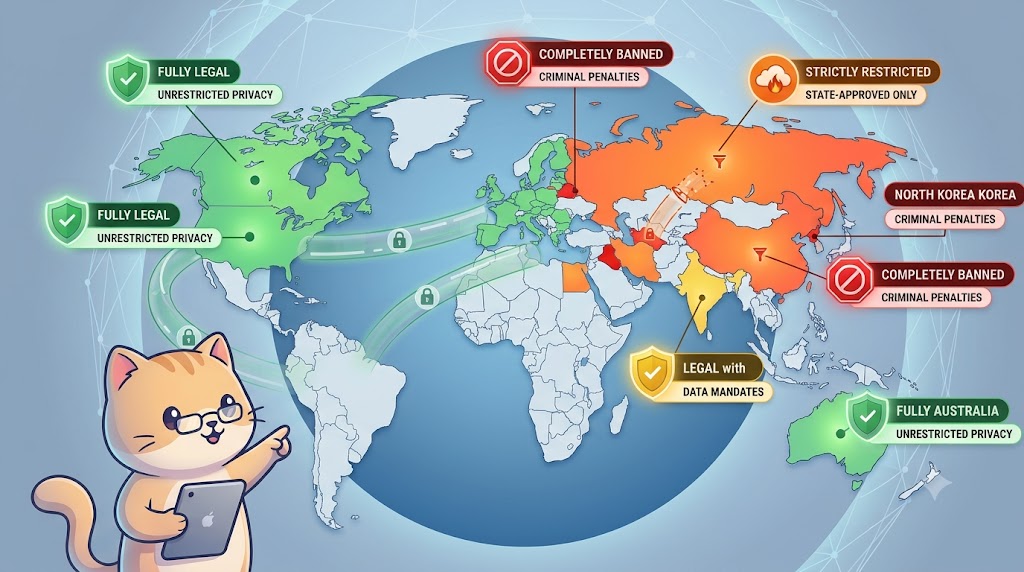
In most of the world—including the United States, Canada, United Kingdom, European Union, Japan, Australia, and South America—VPNs are 100% legal to purchase and use.
Note: While the VPN technology itself is legal, using a VPN to carry out illegal activities online (such as committing fraud, purchasing illegal materials, or launching cyberattacks) remains illegal under local criminal law.
2. Heavily Restricted (Government Mandates & Regulatory Compliance)
In these countries, using a VPN is not strictly illegal, but the government puts strict rules in place. They often block specific VPN protocols or require providers to follow mandatory logging laws that track customer data.
India’s Stance on VPNs: Heavy Regulations and Logging Rules
- Status: Legal, but subject to strict government data retention directives.
- Details: In April 2022, the cybersecurity agency in India known as CERT In introduced a major rule for online security. Any VPN service provider with physical servers operating inside India must collect and store customer data for at least five years. This stored information includes customer names, verified physical addresses, phone numbers, assigned web address logs, and usage timestamps.
- Impact: Because keeping user logs directly undermines how a true zero logs VPN works, major providers including ExpressVPN, NordVPN, and Surfshark pulled their physical servers out of India. Instead, they now offer virtual servers routed through neighboring countries. This allows users to get an Indian web address without sacrificing their privacy or violating local logging rules.
China’s Take on VPNs: The Great Firewall and Strict Bans
- Status: Severely restricted.
- Details: To keep its tight grip on the internet, China relies on Deep Packet Inspection tools within the Great Firewall to spot and shut down unapproved VPN protocols. Legally, people in China can only turn to government sanctioned VPNs. These approved services comply with mandatory log retention rules and grant local authorities full back door access to user data.
- Penalty: Running or selling an unapproved VPN service inside China can lead to huge fines or even prison time. Local enforcement against everyday citizens is quite strict. However, tourists and business travelers using commercial VPNs generally just deal with unreliable connections rather than legal trouble.
Russia’s Rules on VPNs: Protocol Blocks and Strict Censorship Laws
- Status: Heavily restricted.
- Details: The telecom regulator in Russia known as Roskomnadzor requires all VPN providers operating in the country to connect to their State Information System. This system automatically forces VPNs to block any website on the official state blacklist. If a VPN service refuses to follow these government censorship rules, Roskomnadzor systematically blocks that VPN service across local networks.
Iran & Turkey: How Middle Eastern Mandates Target Commercial VPNs
- Status: Restricted / Protocol Blocking.
- Details: During times of political instability or mass demonstrations, authorities in both Iran and Turkey drastically step up their network filtering. They deploy aggressive Deep Packet Inspection tools to block popular VPN protocols, target server address ranges, and shut down access to encrypted messaging apps like WhatsApp and Telegram. To tighten these controls even further, lawmakers in Iran have periodically pushed legislation to criminalize selling and distributing unauthorized VPNs in an attempt to cut off the main tool citizens rely on during crisis events.
UAE & Oman: Strict Telecom Controls and Heavy Financial Penalties
- Status: Restricted for specific uses.
- Details: Having a VPN on your device for everyday privacy or remote work is one hundred percent legal in the UAE. The legal line gets crossed when someone uses a VPN to mask a web address to commit fraud or bypass state telecom blocks, such as making calls on unapproved messaging platforms like WhatsApp, Skype, or FaceTime. Under the UAE Cyber Crimes Law, misusing a VPN to conceal unlawful activity can trigger hefty fines ranging from five hundred thousand to two million AED alongside potential jail time.
3. Strictly Banned or Illegal
In a small group of highly authoritarian nations, personal VPN usage is illegal, and offenders face serious criminal penalties.
- North Korea – The state maintains total control over communications. Foreign internet access is heavily restricted, and unauthorized VPN tools are strictly prohibited.
- Belarus – VPNs have been banned since 2015. Using tools that bypass internet blocks or obscure online identity is illegal.
- Turkmenistan – Internet access is heavily controlled by the state internet provider. VPN services are banned, and citizens attempting to use them face questioning and heavy fines.
- Iraq – Authorities have periodically enacted total bans or regional blocks on VPNs and social media channels during national security operations.
Global VPN Legality at a Glance
| Country / Region | Legality Status | Key Regulatory Condition / Enforcement Level |
| US, UK, EU, CAN | 100% Legal | Fully legal for personal and business use. |
| India | Restricted | CERT-In mandates 5-year log retention for physical servers inside India. |
| China | Restricted | Only government-sanctioned VPNs are legal; unauthorized protocols blocked. |
| Russia | Restricted | Unapproved VPNs banned; providers must enforce state blacklist filtering. |
| UAE & Oman | Restricted | Legal for business/privacy; illegal if used to bypass VoIP or commit crimes. |
| Belarus & Turkmenistan | Illegal / Banned | Banned outright; using VPN tools carries legal penalties. |
Intelligence Alliances and VPN Jurisdiction
Where your VPN provider is legally based matters just as much as the security features built into the app. As your cat guide Cache, I want to highlight that if a provider operates inside a country tied to intelligence sharing groups like the Five, Nine, or Fourteen Eyes alliances, local courts can legally force the company to log your traffic or hand over user records. Those records can then be shared directly with allied partner governments around the world.
- 5 Eyes Alliance: United States, United Kingdom, Canada, Australia, New Zealand.
- 9 Eyes Alliance: 5 Eyes + Denmark, France, Netherlands, Norway.
- 14 Eyes Alliance: 9 Eyes + Germany, Belgium, Italy, Spain, Sweden.
If maximum privacy is your main goal, you should pick a VPN headquartered in a friendly region outside major surveillance alliances. Places like Panama and the British Virgin Islands operate completely outside Fourteen Eyes oversight, while Switzerland maintains strict federal data protection laws. These jurisdictions do not enforce mandatory data logging laws on privacy services, which means local courts cannot force VPN providers to start tracking or saving your web activity.
Free VPN apps sound great on paper, but running a global network of high speed servers requires massive infrastructure and ongoing maintenance costs. If you are not paying for the product, your personal data is often the product. To cover high operating costs and turn a profit, no cost providers frequently track your web activity, inject intrusive ads, or sell your network bandwidth to third party ad networks.
Multiple independent security audits have revealed major risks with free mobile VPN apps. A significant portion of them contain tracking code, sell user bandwidth to residential proxy networks, or log your personal browsing habits to sell directly to data brokers. As your cat guide Cache, I always remind friends that paying a small subscription fee for a verified zero logs service is much safer than risking your personal security on a free tool.
While free VPNs sound convenient, using them comes with several major privacy and security risks.
- Data harvesting and tracking : Free providers often track your online activity and sell your browsing history to third party advertisers and data brokers to make money.
- Malware and ad injection : Many free apps inject annoying pop up ads or even malicious code directly into unencrypted web pages while you browse.
- Bandwidth caps and slow speeds : Free services frequently restrict your monthly data allowance to tiny amounts like 500 MB and deliberately slow down your connection to push you toward paid plans.
- Lack of critical safety features : No cost VPNs often leave out essential privacy protections such as a kill switch, zero logs policies, or strong leak protection.
Alternatives to Traditional VPNs
Depending on your specific online goals, several tools can complement or replace a commercial VPN service.
- Tor or The Onion Router – Tor is a free, open source network designed for maximum online anonymity. It routes your web traffic through three encrypted nodes, known as entry, middle, and exit relays. While Tor offers exceptional protection against surveillance, it operates much slower than a commercial VPN and is not suitable for high bandwidth activities like video streaming.
- Proxy servers like SOCKS5 or HTTP – A proxy acts as an intermediate gateway that masks your web address for a specific app, such as a browser or torrent application. Unlike a VPN connection, a standard proxy server does not provide end to end encryption for your overall network traffic.
- Self hosted personal VPN – Tech savvy users can host a private WireGuard server using cloud infrastructure platforms like DigitalOcean or AWS, or open source tools like Outline VPN. This setup gives you full control over server logs and configuration, though it lacks the shared IP address pool that commercial VPN networks use to blur individual activity.
Pros and Cons of Using a VPN
A Virtual Private Network (VPN) is easily one of the best ways to upgrade your online privacy and security, but it’s not a magic fix for every internet risk. Looking at both the real perks and the practical trade-offs will help you decide if turning on a VPN fits your everyday internet routine.
Advantages of a VPN
Privacy from ISP tracking and data collection
Without a VPN, your internet provider acts as the gateway to everything you do online, logging every website you visit, your online times, and your general location. A VPN scrambles all traffic leaving your device with encryption. This means your provider can only see that you are connected to a VPN server, while your actual browsing history, downloads, and search queries stay completely hidden.
Public Wi Fi protection against local security risks
Open networks at places like coffee shops, airports, and hotels are notoriously insecure because they do not encrypt connection data between your device and the router. Anyone else on that same network using basic sniffing tools can intercept unencrypted passwords, cookies, or personal messages. Running a VPN creates a protected tunnel over public networks, shielding your personal data from local hackers.
Unlocking regional content where VPNs are legal
Streaming services, websites, and online marketplaces often restrict access or change prices based on where you are located. When you connect to a VPN server in a different country, your real web address is replaced with one from that region. This allows you to bypass geographic restrictions, stream region locked libraries, or avoid local network blocks, which is another reason people check where VPNs are legal around the world.
Disadvantages of a VPN
Internet speed decrease
It is normal for a VPN to reduce your connection speed by roughly ten to twenty percent. This happens because encrypting your data and routing it through a remote server adds extra steps and physical distance to your usual internet route. How much your speed drops depends on how far away the VPN server is, how crowded that server is, and the protocol you choose. Connecting to a nearby server running a lightweight protocol like WireGuard usually keeps speed loss to a minimum.
Extra data and battery usage
Because a VPN wraps your network packets in additional layers of encryption, it increases your overall data consumption by around five to fifteen percent. Processing this continuous encryption also puts a slightly heavier workload on your device processor, which can drain laptop or phone batteries faster. If you are on a capped mobile data plan or trying to conserve battery power, choosing modern, lean protocols like WireGuard will use significantly less processing power than older, heavier protocols like OpenVPN.
Platform blocks and CAPTCHAs
Because thousands of users often share the same VPN server web addresses, major websites, banking portals, and streaming networks easily flag these addresses as suspicious or automated traffic. As a result, you might encounter frequent CAPTCHA prompts proving you are not a robot, or streaming platforms like Netflix might block playback until you disconnect or switch servers, which is something people often encounter when testing where VPNs are legal and active.
Summary & Key Takeaways
A Virtual Private Network remains one of the most effective tools for maintaining digital hygiene, protecting personal data on untrusted networks, and preserving online privacy. As Cache, your digital safety guide, I always emphasize that turning on a secure connection is one of the easiest habits to build for everyday peace of mind online.
- How It Works: Simply put, a VPN locks your internet traffic inside a secure, encrypted tunnel while replacing your real-world location with a completely different IP address. As your digital guide Cache, I like to think of it as placing your online activity inside a private, coded protective shell while giving your device a temporary digital disguise.
- Must-Have Features: When choosing a service, make sure to look for independently audited no-logs policies, system-level kill switches, DNS leak protection, fast WireGuard protocol support, and safe incorporation jurisdictions. As your digital guide Cache, I always remind friends that these essential privacy features work together to keep your personal data and browsing activity completely protected.
- Global Legal Landscape: VPNs are fully legal in most Western nations. However, countries like India enforce log retention mandates, while nations like China and Russia strictly limit access to unauthorized providers. In places like Belarus and Turkmenistan, personal VPN use is completely banned.
- Avoid Free Trap: Free VPN services frequently compromise security by selling user logs or bandwidth. Opt for transparent, independently audited paid VPN services or self-hosted alternatives.
Is it legal to use a VPN for streaming Netflix or Disney+?
Yes, using a VPN to access streaming platforms is entirely legal in almost all countries. However, it may violate the streaming service’s Terms of Service (ToS). Platforms use VPN detection tools to block known server IPs, but doing so is a contractual issue rather than a criminal one.
Can my Internet Service Provider (ISP) see what I do when using a VPN?
No. Your ISP can see that you are connected to an encrypted server IP address and know how much data you transfer, but they cannot read your encrypted traffic or see which specific websites, files, or applications you access.
Does a VPN slow down internet connection speeds?
Because a VPN adds an extra routing hop and requires CPU cycles to encrypt and decrypt data, it typically causes a minor speed drop (usually 5% to 15% on high-speed WireGuard protocols). However, if your ISP actively throttles specific types of traffic (like video streaming), a VPN can actually improve performance by hiding that traffic from your ISP.
What happens if I use a banned VPN in a restricted country?
In nations with active VPN blocks (such as China or Russia), unapproved VPN connections will usually simply fail to establish a connection. In strictly banned jurisdictions (such as Turkmenistan or Belarus), using unauthorized privacy tools can result in fines, confiscation of devices, or legal questioning by local authorities. Always research local laws before traveling abroad.
