Share This Article
Hello friend! Cache here, your favorite tech savvy girl cat, and I am so excited to help you today. If you are like most freelancers I meet, you started your journey because you love creating things. You wanted the freedom to write, design, code, draw, or build marketing campaigns on your own terms. But then the reality of running a solo business landed right on your lap. Suddenly, you spend half your day wrestling with messy spreadsheets, reading long emails, writing repetitive check ins, and sorting out daily tasks. It can make you feel completely drained before you even start your real work.
The wonderful news is that using dependable free AI tools for freelancers can help you take back control of your schedule. You do not need a giant budget or fancy software to make your day run smoothly. In this guide, I will walk you through how to connect your everyday apps, get rid of boring busywork, and build smart little pipelines that do the heavy lifting for you. We are not turning your business into an impersonal robot. Instead, we are setting up gentle helpers in the background so you have more energy to do what you do best and keep your clients smiling.
What Is Freelance Workflow Automation
Let me explain workflow automation in the simplest way possible. Imagine a neat line of dominoes resting on your desk. When you gently tap the very first domino, it knocks down the second, which knocks down the third, and the whole line finishes on its own without you touching every single piece. That is exactly how automation works for your freelance projects.
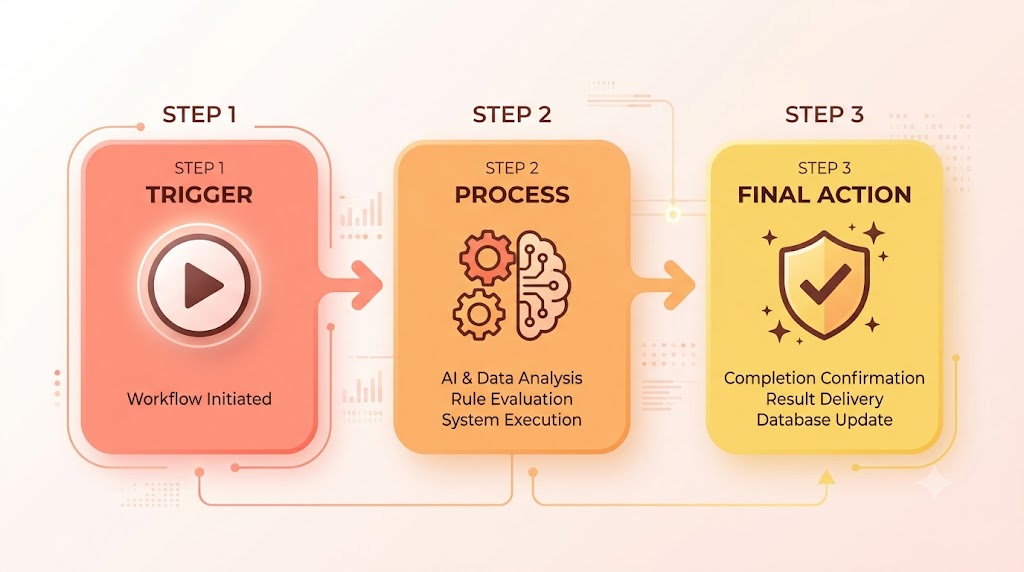
A basic automated workflow moves through three easy steps.
First is the Trigger. This is the starting bell that kicks things off, like a new client filling out a contact form on your portfolio website.
Second is the Process. This is where your data gets organized, cleaned up, or analyzed. For instance, a smart helper can read through that inquiry and attempt to pull out the project timeline, budget, and deliverables.
Third is the Action. This is the finished result that happens in your workspace, such as a new project card popping up in your dashboard alongside a gentle alert on your phone.
To keep things crystal clear, let us look at the difference between three terms people often mix up.
Artificial intelligence refers to smart tools that can read, write, organize, or summarize text when you give them instructions.
Basic automation refers to simple digital plumbing that moves data from point A to point B based on clear rules, such as saving email attachments into a cloud folder automatically.
AI powered automation is where the real fun begins. It takes that plumbing and adds a smart helper right in the middle. The system picks up your raw information, lets an AI tool organize or summarize it, and drops the finished result right where you need it.
What Can Freelancers Actually Automate
You might be wondering what parts of your daily routine you can hand off to a digital helper. The exciting part is that many repetitive tasks that follow a predictable pattern can be automated to give you your focus back.
When new client inquiries arrive, an automated setup can log the incoming message while an AI assistant analyzes the inquiry to attempt to extract details such as the budget, deadline, and deliverables for you to review. You can also summarize long meeting transcripts into quick action item lists, or automatically create starter checklists inside your workspace whenever a new project kicks off.
Beyond your daily client work, automation helps keep your business records organized with almost no effort. Basic connections can send contact form details straight into a tidy client database without any copy and paste mistakes. You can also turn rough notes into structured outlines for your blog, or set up automated reminders that create follow up email drafts to ask for a testimonial once a project is finished. By letting smart systems move your routine data around, you save your mental energy for big decisions and meaningful client chats.
What You Should Never Automate
Now hold your paws for just a moment! Just because we can automate something does not mean we should. There are some parts of your freelance business that always need your personal human warmth, your sharp instincts, and your unique point of view.
Never send final client work without reviewing it yourself. Smart tools are fantastic for brainstorming, drafting, and organizing, but you are the true expert your client hired.
Never automate sensitive client conversations. If a client is feeling stressed, or if there is an unexpected bump with a budget or deadline, take a moment to write that message yourself with genuine empathy.
Never put legal, tax, or contract decisions on autopilot. You should always read agreements carefully, double check your invoices, and handle your financial details by hand.
Never share private passwords, client customer lists, or confidential files with third party tools without clear permission and strong safeguards.
My golden rule is very simple. Automate the repetitive data moving, but always keep full personal control over your relationships and the final quality of your work.
Best Free and Free-Tier Tools for Freelancers
You do not need an expensive stack of premium tools to get your business running like clockwork. You can build practical starting systems using free tiers that cover every essential stage of your work.
Not every tool in this guide is an AI tool. ChatGPT provides the smart writing and analysis assistance, Zapier and Make connect your apps and move your data, and Notion provides a clean home to organize all the resulting information.
1. ChatGPT by OpenAI
ChatGPT serves as your personal writing assistant, researcher, and editor. You can use it to summarize long project briefs, clean up messy meeting notes, brainstorm content ideas, and draft friendly emails in a few seconds.
The Free plan gives you access to handy features like web search, file uploads, and data analysis, though usage limits apply and can change over time. While it does not include advanced team workspaces, it offers plenty of power for everyday freelance drafting, organizing, and brainstorming.
2. Zapier
Zapier acts like digital glue that connects your favorite web apps together without requiring any coding knowledge. It quietly listens for an event in one app, like a new form submission, and tells another app what to do, like creating a new database record.
Zapier currently offers a Free plan with one hundred tasks per month and supports simple two step connections. It is super easy to set up, making it a wonderful starting point for beginners who want to build their very first pipeline.
3. Notion
Notion functions as a flexible all in one workspace for your client records, project trackers, and notes. It gives you a clean visual dashboard where you can track project milestones, manage new leads, and keep all your research in one tidy place.
The Free plan provides useful workspace, page, and database features for individual users, making it a practical home base for all your freelance projects. It connects smoothly with automation tools like Zapier and Make so incoming data can land straight into your workspace.
4. Make
Make is a visual workflow automation platform that lets you connect your apps using a fun drag and drop screen. It is an amazing option for visual thinkers who like to see how their information travels from one app to the next.
Make offers a free plan with a monthly credit allowance, though limits and features can change over time. It gives you an intuitive canvas to connect multiple web apps and map out how data moves across your daily freelance routine.
Free Does Not Mean Unlimited
Free AI and automation tools can be more than enough to build helpful freelance workflows, but free plans almost always come with boundaries. These limits can include monthly task counts, credits, workflow steps, AI usage caps, or specific app connections. Before you build a new setup, take a quick peek at the current limits of the tools you want to link together so your system runs smoothly all month long.
How to Build Your First Automated Freelance Workflow
Let us build a simple, reliable starter workflow together using a free two step setup. We will send a new client form submission directly into your Notion client database. After that, we will look at how a smart AI step can fit into a bigger setup.
Example: Google Forms to Notion
Here is the simple path you are going to create.

New Google Form Submission leads to your Zapier Trigger, which leads to Create Notion Database Item.
Step 1. Pick a Repetitive Task
Think about what happens when a new client wants to work with you. Manually copying their name, email address, and project notes from an email into a spreadsheet takes up precious time and is easy to forget when you are busy.
Step 2. Map Out the Steps on Paper
Before clicking buttons inside your tools, jot down the simple path you want your information to take.
- The client fills out your contact form.
- The automation tool spots the new entry.
- The system creates a fresh record in your Notion database.
Step 3. Pick Your Starting Trigger
Open your automation tool, such as Zapier, and choose your trigger. Select your form app, like Google Forms, and choose the option for a new form response.
Step 4. Add the Smart Processing Step (Optional)
For a basic free setup, you can send the form submission straight to your destination app. If you want an AI helper to summarize or categorize the note first, you may need an AI integration or a paid automation feature depending on the platform you choose.
Step 5. Add Your Actions and Match Your Fields
For our basic free two step setup, pick Notion as your action app and choose the action that creates a new database item. Select your Client Pipeline database, and then match your form questions directly to your Notion database columns.
| Form Field | Notion Property |
| Name | Client Name |
| Project Description | Project Description |
| Budget | Budget |
| Deadline | Deadline |
The exact names might look slightly different depending on your form questions and database layout, but the idea is the same. You are simply matching each answer to the correct spot in your table.
Step 6. Test Your Setup
Send a test message through your form using sample details. Check your automation dashboard to make sure the trigger fired properly and that your new client card appeared inside Notion with all the right information.
Step 7. Keep an Eye on Things
Once your automation is running, check your task dashboard every once in a while. Make sure you stay comfortably within your monthly limits and check that your connected accounts stay logged in and happy.
What an AI Powered Version Could Look Like
If you want to expand this idea down the road, an advanced setup can add a smart review step before creating records or drafting replies.
New Form Submission leads to AI analyzes the inquiry, which leads to Notion client record, which leads to Email draft created.
The basic setup above can be started with a free two step plan. Adding AI processing and extra actions creates a more advanced workflow, and the required AI integrations or features may require a paid plan depending on your platform.
Here is a simple example prompt you could give the AI step.
Review this client inquiry and extract: 1. Project type, 2. Main deliverable, 3. Deadline, 4. Budget, 5. Special requirements. Return the information in a clear, structured format.
Always take a moment to review the AI output before using it to make client decisions.
5 Practical Automations Every Freelancer Can Explore
Here are five practical ideas you can explore using free or free tier tools to make your daily routine feel effortless.
1. New Lead Form to Client Database
Workflow: New Lead Form to Notion Client Database
- What You Can Do on a Free Tier: A simple two step automation can instantly drop incoming form answers straight into your Notion client tracker.
- What May Require Paid Features: Adding automatic AI lead scoring or priority tags during the transfer may require an AI integration or paid tier depending on the tool.
- Human Review Needed: Always check new lead entries yourself before reaching out or preparing a custom proposal.
2. Meeting Notes to Actionable Tasks
Workflow: Meeting Transcript to ChatGPT to Action Item List
- What You Can Do on a Free Tier: You can paste a meeting transcript into the free version of ChatGPT and ask it to pull out clear action items for you.
- What May Require Paid Features: Watching a cloud folder for new audio uploads, running automatic transcriptions, and creating tasks without manual help often requires multi step pipelines.
- Human Review Needed: Review the action list to ensure all deadlines and deliverables match what you and your client agreed on.
3. New Project to Onboarding Checklist
Workflow: Project Status Active to Project Template to Checklist
- What You Can Do on a Free Tier: When you switch a project status to Active in your workspace, simple database templates can generate a standard starter checklist for you.
- What May Require Paid Features: Having an AI read a signed proposal to automatically write a custom milestone plan can require advanced automation logic.
- Human Review Needed: Check that your checklist fits the specific timeline and goals of that unique project.
4. Completed Project to Review Request Draft
Workflow: Project Complete to Review Request Draft
- What You Can Do on a Free Tier: You can use a saved prompt template in ChatGPT to draft a warm, friendly review request based on your project notes.
- What May Require Paid Features: Creating delayed triggers that watch for invoice updates and generate email drafts across multiple apps usually requires multi step workflows.
- Human Review Needed: Always read through and personalize your note so it reflects your genuine relationship with that client.
5. Rough Voice Note to Content Outline
Workflow: Voice Note Transcript to ChatGPT to Content Outline
- What You Can Do on a Free Tier: You can paste a transcript of your quick voice notes into ChatGPT and ask it to organize your thoughts into a structured outline.
- What May Require Paid Features: Building a pipeline that picks up audio files from cloud storage and creates new pages automatically requires multi step operations.
- Human Review Needed: You remain the creative mastermind responsible for writing, fact checking, and polishing your final content.
How to Automate Without Losing Your Human Touch
One of the biggest mistakes you can make is turning your freelance business into an impersonal answering machine. Clients love working with independent freelancers because they appreciate direct communication, genuine flexibility, and real human care.
Review your generated message drafts. Set any email workflows to create drafts in your inbox instead of sending them out automatically. Taking half a minute to add a warm personal line ensures you sound like a thoughtful partner.
Verify project details and numbers yourself. While smart tools can read project briefs in a flash, you must personally check all pricing, timelines, and contract terms against your real energy and schedule.
Never automate sensitive messages. If a project runs behind schedule or a surprise comes up, sit down and write the message yourself. Honest, thoughtful communication builds long term client trust that no automated bot can ever match.
Privacy and Client Confidentiality
When you link web tools together, data travels between different apps and online platforms. Keeping your client information safe is super important for your reputation as a trusted professional.
- Protect confidential information by avoiding pasting private passwords, client customer lists, financial details, or proprietary code into third party tools.
- Review data settings to understand how your inputs are stored or handled before you send client information through any app.
- Respect client agreements by making sure third party digital processing is allowed under any non disclosure agreements you have signed.
Common Mistakes to Avoid
When you start exploring automation, keep these helpful tips in mind so your setups stay reliable and stress free.
Avoid automating a messy process. If your manual filing system is unorganized, automating it will only create clutter faster. Always get your steps clear on paper first.
Keep an eye on free plan limits. Setting up big, complicated workflows without checking your monthly task allowance can cause your automations to pause unexpectedly when limits are reached.
Never skip testing. Always run a few sample tests through your automations to make sure everything lands in the right fields before using them with real clients.
Treat AI results as helpful rough drafts. Smart summaries are wonderful starting points, but they always need a quick look from you before you make business decisions.
How to Pick the Right Tools for Your Business
Finding the perfect combination of free AI tools for freelancers comes down to what you want to improve in your daily workflow.
ChatGPT is wonderful for research, drafting, and summarizing messy notes. Freelancers love it because it is simple to use and provides instant writing help without any setup. The free plan covers everyday writing and analysis, while paid tiers offer higher usage allowances and extra tools.
Zapier is ideal for straightforward app connections. It is perfect for beginners who want simple and dependable triggers, like sending form answers straight to a database. The Free plan includes one hundred tasks every month for two step workflows, while paid plans unlock longer multi step pipelines.
Notion is great for organizing your projects, notes, and client records in one central workspace. It gives you a clean visual hub to manage your daily tasks and active deliverables. The Free plan offers rich workspace and database tools for individuals, making it a practical home base for your business.
Make is built for visual workflow automation where you want to see your data moving between apps on an open canvas. It is a fantastic choice for visual thinkers who enjoy dragging and dropping connected steps. The Free plan provides a monthly credit allowance, while paid plans offer higher limits and additional features.
Final Thoughts
Making your freelance workflow smoother is not about turning yourself into a machine. It is all about clearing away repetitive data entry and busywork so you have plenty of room to think, create, and deliver your absolute best work.
Take things one gentle step at a time. Pick one small, repetitive task this week, connect it with a simple free tier workflow, and see whether it makes your workday feel lighter. Keep your client connections warm and personal, let simple automations handle the routine chores, and enjoy having more focus for the creative projects you love.
Frequently Asked Questions
Can I really automate my freelance workflow for free?
Yes, you can start automating parts of your freelance workflow using free tiers of tools such as ChatGPT, Notion, Zapier, and Make. However, free plans have limits on usage, workflow steps, AI features, or integrations, so more advanced workflows may require a paid plan.
What is the best free AI tool for freelancers?
ChatGPT is a very helpful free AI tool for drafting, summarizing, and editing your day-to-day text. For connecting your web apps, platforms like Zapier and Make offer free plans that let you experiment with basic automation.
Can ChatGPT automate my business on its own?
ChatGPT can provide the AI processing part of a workflow, but connecting it to other apps automatically may require an integration platform, API, or another supported automation method.
Is Zapier completely free?
Zapier currently offers a Free plan with 100 tasks per month and two-step Zaps. More advanced workflows, including multi-step Zaps and certain AI features, may require a paid plan.
Should I choose Zapier or Make?
Zapier is very beginner-friendly for setting up simple two-step automations. Make offers a Free plan that can be useful for experimenting with visual workflow automation. Its current credit limits and feature availability should be checked before building a larger workflow.
Which task should I automate first?
Start with your basic client intake form. Routing form submissions into a Notion database is simple to build, low-risk, and can reduce repetitive data entry whenever a prospective client reaches out.
Will automating my workflow make me look unprofessional?
Not if you keep human review in the loop. As long as you review drafts and maintain personal communication on important decisions, your clients will appreciate your organization and quick response times.