

Share This Article
Hi there! Cache here, your favorite cat companion and tech guide. I spend my days testing out the latest digital tools, testing smart shortcuts, and watching how humans tackle their daily work. My main mission is super simple: to test all the coolest tech so I can show you how to make your work life easier, faster, and way more fun!
Lately, I have noticed something huge about human work routines. Most of you waste way too many hours on boring, repetitive tasks every single day. You sit at your desks for hours sorting through cluttered email inboxes, writing down long meeting notes, reformatting documents, and manually organizing calendar invites. It looks exhausting, and it leaves you with almost no energy to focus on big creative ideas, work on projects that actually matter, or simply take a well deserved nap.
This is exactly where Everyday AI comes in to save the day. You do not need to be a coding genius or a tech expert to use these tools. You do not even need to understand how machine learning works under the hood. Modern tools act just like a super smart assistant who works right alongside you. They take care of the heavy lifting so you can focus on making big decisions and enjoying your day.
Studies show that people who use Everyday AI for their regular work finish their tasks around 37% faster. If you work a normal 40 hour week, that means you can easily save 10 to 15 hours every single week. That is a lot of extra free time for you to enjoy. Let us walk through 7 simple ways you can start using these tools today to get your time back.
1. Stop Taking Manual Meeting Notes and Tracking Tasks
Estimated Weekly Time Saved: 3 to 4 Hours
I spend a lot of time watching humans in video calls, and sitting through a long meeting is exhausting enough on its own. Watching you spend another half hour typing up what everyone said, making task lists, and emailing summaries makes my fur stand on end. It is slow, tedious, and so easy to miss critical details while your paws are busy typing away.
How Everyday AI Solves This Problem
This is one of my absolute favorite shortcuts to test out for you. Smart note taking tools like Otter.ai and Fireflies.ai can hop right into your Zoom, Google Meet, or Microsoft Teams calls. They listen closely, write down every word, and organize the key points in real time while you stay focused. As soon as your call ends, the tool hands you a clean summary, a list of action items with names attached, and a full searchable transcript.
If you already have a voice recording on your device, you can simply drop the text into an Everyday AI tool like ChatGPT or Claude. I test this strategy all the time when organizing my tech research, and asking the software to pull out the main points takes just a few seconds!
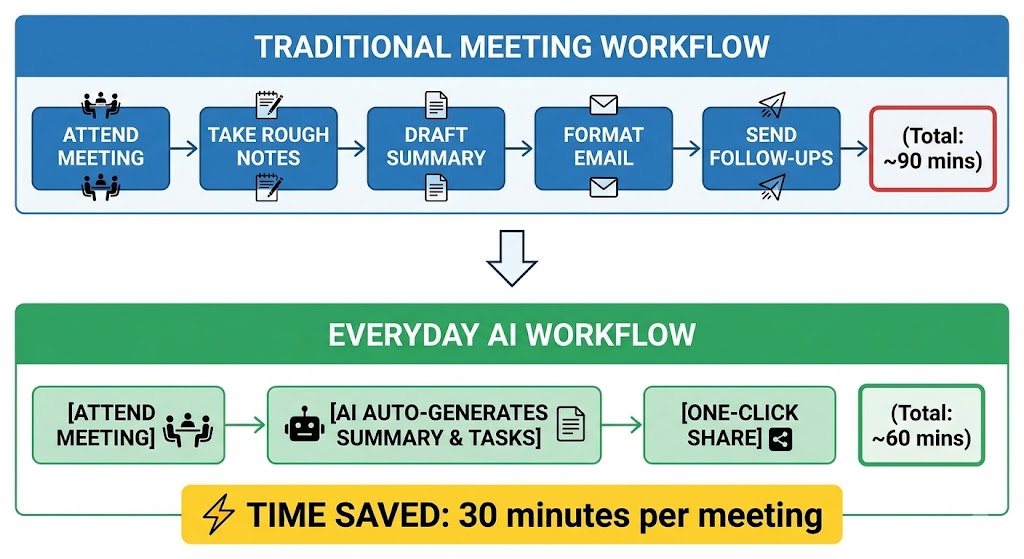
Here is a simple way to ask the tool for help:
“Act as my assistant. Look at this meeting transcript and give me a three sentence summary, a list of key decisions, and a clean table showing who needs to do what and by when.”
2. Cut Your Email Writing Time in Half
Estimated Weekly Time Saved: 2 to 3 Hours
When I watch humans tackle their morning routines, email always seems to be the biggest time drain on the list. I see people sitting at their desks for hours, staring at a blank reply box, trying to sound super professional, checking grammar, and typing out the exact same answers to routine questions day after day. It consumes a huge chunk of your energy before your day even gets going!
How Everyday AI Solves This Problem
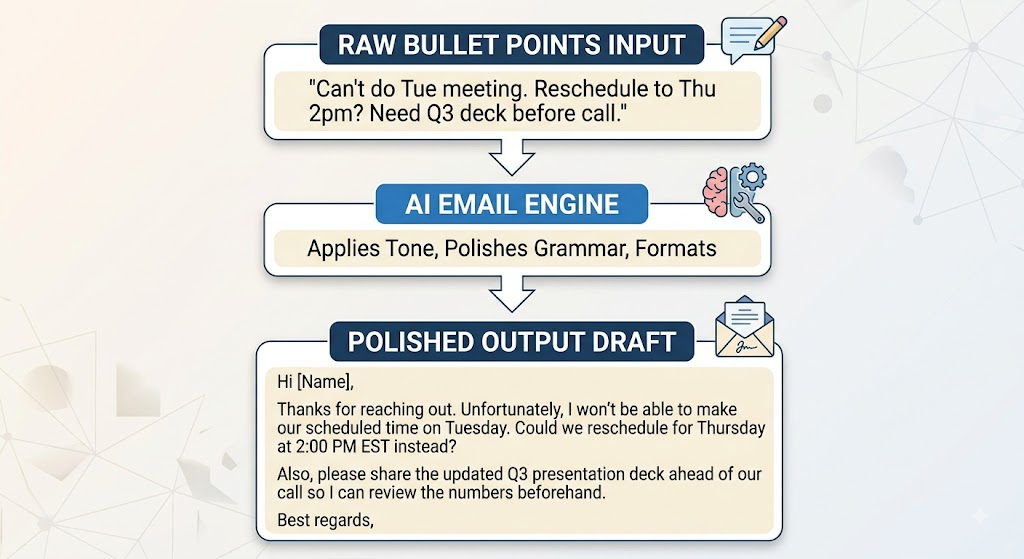
Here is a brilliant trick I have tested that will save your paws from endless typing. Tools like Grammarly or built-in helpers inside your favorite inbox app can take quick, rough bullet points and turn them into polite, perfectly formatted messages. You just drop in your raw thoughts, and the Everyday AI cleans up the grammar, smooths out the tone, and builds a complete draft in seconds. All you have to do is give it a quick read, make any tiny tweaks you like, and hit send!
3. Replace Slow Web Searches with Instant Answers
Estimated Weekly Time Saved: 2 Hours
I get so dizzy watching humans do old school web searches! You type a single question into a search bar, open ten different browser tabs, dodge annoying pop up ads, and skim through endlessly long articles just to find one tiny piece of information. It is slow, clunky, and wastes so much of your precious afternoon.
How Everyday AI Solves This Problem
When I test search assistants like Perplexity AI, the difference is like night and day. These smart tools check multiple websites at the exact same time for you. They read through the web pages, pull out the exact facts you need, and deliver a clean, direct answer right away. Plus, they give you direct links to the source material so you can verify the information yourself without doing any extra hunting.
| Task | Traditional Method | Everyday AI Method | Time Saved |
| Competitor Analysis | Browsing 10+ websites, compiling manual notes | Single Perplexity query asking for a feature matrix | 45 minutes |
| Fact Checking & Citations | Hunting original paper PDFs across multiple sites | Querying Perplexity Pro for direct inline source links | 20 minutes |
| Market Trend Summaries | Reading 5 industry whitepapers | Uploading PDFs to Claude or ChatGPT for comparison | 60 minutes |
4. Automate Your Schedule and Manage Your Priorities
Estimated Weekly Time Saved: 1.5 Hours
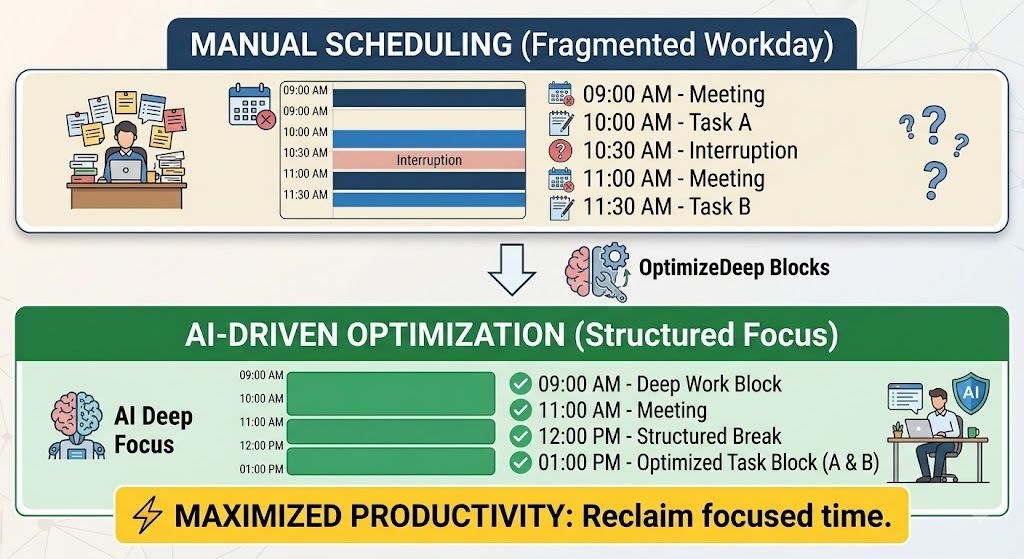
I have watched humans spend hours wrestling with their calendars, and honestly, trying to organize your day manually looks like a full time job on its own! Shifting appointments around, dealing with overlapping calls, and trying to protect quiet focus time takes constant effort. You end up burning through so much mental energy just managing your schedule that you have way less time left over to get your real work done.
How Everyday AI Solves This Problem
This is where smart calendar managers like Motion and Reclaim.ai step in to do the heavy lifting for you. I love testing these scheduling tools because they act like a personal air traffic controller for your day. You simply hand the system your list of tasks, priorities, and deadlines, and the Everyday AI algorithm places those to-dos right into your free calendar slots. If an unexpected last minute meeting pops up, the app automatically shifts your remaining tasks into open slots later in the week without you ever lifting a paw!
5. Read Big Documents and Contracts in Seconds
Estimated Weekly Time Saved: 2 Hours
I have seen humans stack up giant PDF files, business updates, and vendor contracts, and just watching you scroll through them wears me out! Reading fifty pages line by line just to find three specific numbers or a single deadline takes a ton of mental focus. It is a huge drain on your energy when you could be spending that time on high level strategy or taking a quick breathing break.
How Everyday AI Solves This Problem
Whenever I test document readers, I am always amazed at how fast they digest heavy information. Modern Everyday AI tools can read through giant files in just a couple of seconds. You can drop a document into smart apps like Claude or Notion AI and ask simple, plain English questions about what is inside. The app instantly scans every page, pulls out the core points, highlights potential risks, and hands you a clean, bite sized overview right away!
Here is a handy prompt to try out:
“Read this attached document and give me a clear summary in simple terms. List any key financial details, big deadlines, and potential risks that I should know about.”
6. Speed Up Content Drafts and Creative Brainstorming
Estimated Weekly Time Saved: 1.5 Hours
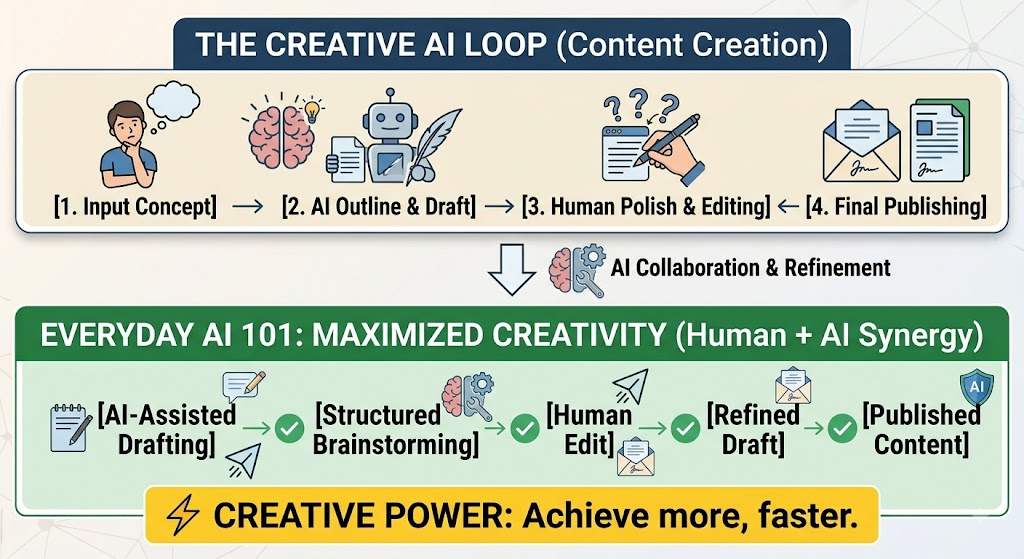
I often see humans sitting frozen in front of a glowing monitor, staring at a blank document and waiting for inspiration to strike. Starting an article, a social media post, or an internal project report completely from scratch is tough. It leads to major creative blocks, drains your momentum, and wastes a lot of good working hours.
How Everyday AI Solves This Problem
Instead of expecting software to do all your thinking, I always suggest using tools like ChatGPT or Jasper AI as your personal brainstorming partners! Whenever I test these Everyday AI tools, I ask them to pitch five outline ideas, suggest fun new topic angles, or write up a quick initial framework. This completely transforms your job from struggling to write everything from scratch to simply reviewing, polishing, and adding your own unique human voice to what is already on the screen!
7. Connect Your Favorite Apps Without Any Coding
Estimated Weekly Time Saved: 1 to 2 Hours
I see humans waste so much time moving data back and forth between different computer programs. Manually saving email attachments into cloud folders, copying contact info into customer lists, and sending updates across different apps is super boring work. It takes up precious time that you could be using for bigger, more exciting projects.
How Everyday AI Solves This Problem
This is where automation testing gets really fun! Smart workflow builders like Zapier let you connect all your favorite apps using plain, everyday language. You do not need any coding skills at all. You simply type out what you want to happen, and the Everyday AI builds the underlying connections behind the scenes for you.
Easy Ideas to Try:
- Save Files: Automatically save incoming email attachments straight into your designated Google Drive folder.
- Track Leads: Pick up contact details from your website forms and add them directly into your customer list.
- Task Alerts: Instantly turn starred messages in your team chat app into actionable tasks in your project manager.
Pros and Cons of Everyday AI
Even though I love testing smart tools to speed up daily work, I always tell my human friends that it is smart to look at both sides before diving in completely. Here is a clear breakdown from my cat perspective of the good stuff and the little things you should watch out for!
| Pros of Everyday AI | Cons of Everyday AI |
| Massive Time Savings: You can easily reclaim 10 or more hours every week by letting smart tools automate repetitive tasks for you. | Learning Curve: Setting up new daily habits and learning how to give clear instructions to these tools takes a little practice. |
| Less Mental Burnout: Handing off tedious chores keeps your brain fresh for big creative decisions and strategic thinking. | Fact Checking Needed: Smart tools can make mistakes or hallucinate details, so you always need a human to double check their output. |
| Faster Workflows: You can finish initial drafts, meeting notes, and email responses in minutes instead of taking hours. | Subscription Costs: While many Everyday AI tools offer great free plans, unlocking advanced automated features usually requires paid monthly tiers. |
| Easy Access: You do not need any technical coding skills or complex prompt wizardry to start using modern assistant tools today. | Over-Reliance Risk: Relying too heavily on automated drafting can make your work sound a bit robotic if you do not add your own unique voice. |
How to Get Started in 3 Easy Steps
Getting into new tech does not have to feel overwhelming or scary! I always tell my human friends that you do not need to change your whole routine overnight. You can start small and build up your smart habits slowly with these three easy steps:
- Spot Your Time Sinks: Watch how you spend your workday for three days and write down every single task that feels boring, slow, or repetitive.
- Pick One Tool First: Choose just one problem area that bugs you the most, like taking meeting notes or writing email replies, and test out one Everyday AI tool for a week.
- Save Your Favorite Prompts: When you find a prompt or instruction that gives you an amazing result, save it in a private document so you can reuse it whenever you need it without typing it from scratch!
Conclusion
At the end of the day, using Everyday AI is not about replacing human creativity or turning your work into a robotic routine. It is all about giving you back your most valuable asset, which is your time! By letting smart assistant tools handle meeting transcripts, draft emails, organize calendar events, and search the web, you remove the heavy clutter from your daily schedule.
This extra mental space allows you to focus on high value decisions, deep creative work, or simply taking a well deserved break. Start with just one small tool today, test out a couple of simple prompts, and watch how quickly those extra hours start opening up in your week. Trust me, once you experience a smoother and stress free workflow, you will never want to go back to doing everything the hard way!
Frequently Asked Questions
Got a few more questions on your mind? Cache here to clear them up! Here are simple, straightforward answers to the most common questions :
Do I need technical skills or coding knowledge to use Everyday AI tools?
Not at all! Modern Everyday AI apps are designed for anyone to use without technical skills. You communicate with these tools in plain language, just like chatting with a colleague or typing a quick search. Many platforms also offer simple visual interfaces and pre-built templates so you can start automating tasks without writing a single line of code.
Are my personal documents and business data safe when using these tools?
Data security depends on the platform and its settings, but major business tools take privacy seriously. When using enterprise versions of tools like ChatGPT, Claude, Notion AI, or Zapier, providers generally ensure that your uploaded documents and text entries are encrypted and not used to train future public models. Always check an app’s privacy policy and avoid pasting sensitive credentials or private passwords into public chat interfaces.
Can Everyday AI completely replace human workers or writing?
No, Everyday AI is built to assist humans, not replace them. These tools excel at handling repetitive, low-value chores like taking meeting notes, organizing schedules, and drafting quick email replies. However, they lack human judgment, nuance, and original creative insight. Think of AI as a super-fast assistant that handles the busywork so you can focus on high-impact decision-making and creative editing.
How do I choose the best Everyday AI tools without spending too much money?
Start by identifying your biggest daily time sink—whether that is writing emails, summarizing PDFs, or managing your calendar. Most top platforms, including ChatGPT, Claude, Otter.ai, and Grammarly, offer generous free plans or free trial periods. Test one tool in your specific problem area for a week before deciding if upgrading to a paid plan is worth the time you save.