

Share This Article
Hey there, human friends! Cache here, your curious tech cat hopping down from my cozy window spot to help you build your very first home on the internet.
Launching a website is super exciting, but I know all those scary technical words can make your head spin. When stuff like DNS records, TLDs, shared servers, and cPanel start getting tossed around, it is completely normal to feel a little lost.
Strip away all that confusing chatter and you will see that every single website relies on two main building blocks, which are a domain name and web hosting. Think of a domain name as the digital street address that brings visitors right to your front door, while web hosting is the actual cozy home where all your files, images, and content sleep safely. They work together like total best friends to get your site online, but each of them actually has a completely different job to do.
Figuring out how a domain name and web hosting work together is the single most important first step Cache can teach you before you spend a single penny on fancy website tools!
What is a Domain Name?
So what exactly is a domain name anyway? Well, my curious human friends, a domain name is simply the digital address of your website. It is the exact set of words people type right into their web browser address bar when they want to visit your online space, just like typing google.com or wikipedia.org!
Back in the early days of the internet, visiting a website was not so easy. People had to type in long, boring strings of numbers called IP addresses, like 192.0.2.1. Now, computers love numbers, but human brains remember actual words much better! That is why smart tech creators invented the domain name system, so we could swap those messy number sequences for easy, readable web names.
To help you picture this, Cache loves using a simple house analogy!
- Your Physical House: This represents the actual files, pictures, and content sitting inside your website.
- Your Street Address: This is your domain name and web hosting signpost that tells all your visitors exactly where to find your home on the giant internet map!
How the Domain Name System (DNS) Works

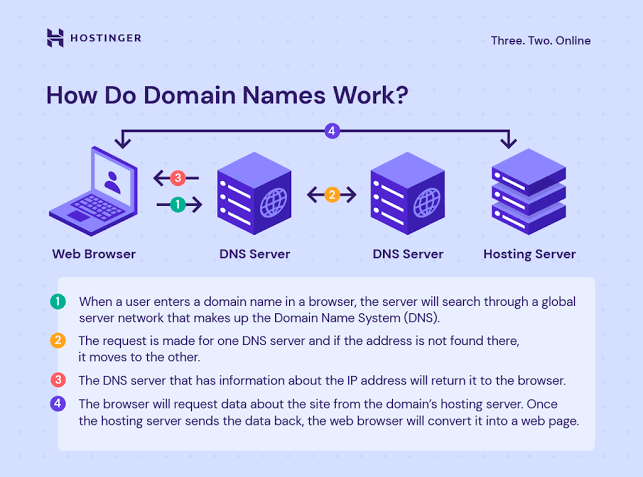
Now let us talk about how the Domain Name System works behind the scenes! You can think of the DNS as the ultimate phonebook of the internet. Whenever a human friend types your web address into a browser, this clever system instantly translates those friendly words into the exact numeric IP address your computer needs to find your server.
Here is how the magic happens behind the scenes in just a split second!
- A visitor types your domain name directly into their browser address bar.
- The browser sends a quick message over to a helper server called a DNS resolver.
- The DNS resolver looks through its huge internet contacts list to locate the exact numeric address attached to your name.
- The request travels straight to the computer that holds your domain name and web hosting files.
- The web server sends all your pictures and text back to the visitor, loading your beautiful website right on their screen!
Understanding Domain Terminology
Before you pick out your brand new web name, you need to know how domain endings and structures work! Do not worry, my human friends, Cache is here to break down all these fancy tech terms into super simple pieces.
Here are the four main domain categories you will see when setting up your online space.
- Top Level Domains : The Top Level Domain, or TLD, is simply the little ending tag that appears at the very end of your web address.
- Generic TLDs: These are the most famous endings around the globe that everyone recognizes, such as .com, .net, .org, .info, and .biz.
- Niche TLDs: These are fun modern endings tailored for specific topics or shops, such as .tech, .store, .blog, and .agency.
- Country Code Top Level Domains : Country code extensions are special two letter tags saved for specific geographic locations around the world.
- Popular examples include .us for the United States, .uk for the United Kingdom, .in for India, and .ca for Canada.
- SEO Superpower: Search engines love using these country tags to show your website to local humans searching right in your hometown or country!
- Sub Domains : A sub domain is like a little child room attached to your main website home. It lets you organize different sections of your site without spending extra money to buy a brand new address.
- How it looks: You might see web addresses like blog.yourwebsite.com or store.yourwebsite.com.
- Why use it: It is perfect for keeping your online shop, blog, or secret developer testing area separate from your main homepage.
- Add On Domains vs Parked Domains
- Add On Domain: This is a completely separate website address that lives inside your existing hosting account. It shares your storage space, but to your visitors, it looks like a totally independent home on the web.
- Parked Domain: This is a web address you buy just to save ownership for later. It is not attached to its own unique site yet, so it usually points straight back to your main domain name and web hosting setup or displays a simple coming soon page.
How Domain Registration & Privacy Protection Work
Ready to claim your very own piece of internet real estate? Let Cache show you how simple it is!
All web addresses across the globe are overseen by a big organization called ICANN. To get your hands on one, you simply rent a license from a certified domain registrar like Namecheap, GoDaddy, or Cloudflare.
Here is the exact step-by-step path Cache takes whenever she registers a new web address!
- Search Availability Head over to your favorite domain registrar website and type your dream name into their search bar to see if anyone else claimed it first.
- Select Your Extension Pick out the ending tag for your address. Cache always recommends grabbing a .com tag if you want to reach human friends all over the world!
- Provide Your Details Enter your real name and contact details, which are required by international web regulations to prove you are the real owner.
- Select Registration Duration Decide how many years you want to keep the address reserved, usually anywhere from 1 year up to 10 full years.
- Complete Checkout Pay the annual fee to lock down your brand new name so no one else can steal it! Once you link this address with your domain name and web hosting plan, your new online home is ready for visitors.
What is WHOIS and Domain Privacy Protection?
Now let us talk about keeping your personal information safe on the internet!
Whenever you register a web address, global web rules require your real name, personal email, phone number, and home address to be saved in a public online registry called WHOIS. Think of WHOIS as a giant public directory that anyone in the world can check at any time.
Without any shield on your account, sneaky spammers, telemarketers, and data scrapers can easily look up your contact details and start cluttering your inbox with spam!
That is where Domain Privacy Protection comes in to save the day!
- Often Comes Completely Free: Many modern, reliable registrars give you this awesome privacy protection for free when you pair your address with a solid domain name and web hosting package!
- Hides Your Personal Details: Domain Privacy Protection acts like a protective cloak for your private information. It masks your personal name, home address, and phone number on the public WHOIS registry.
- Replaces Private Info with Proxy Details: Instead of displaying your real contact details to strangers, your domain registrar displays generic proxy info on the directory.
- Keeps Your Inbox Safe from Spammers: By blocking public access to your email, you stop annoying sales calls, spam emails, and digital scrapers before they even start.
What is Web Hosting?
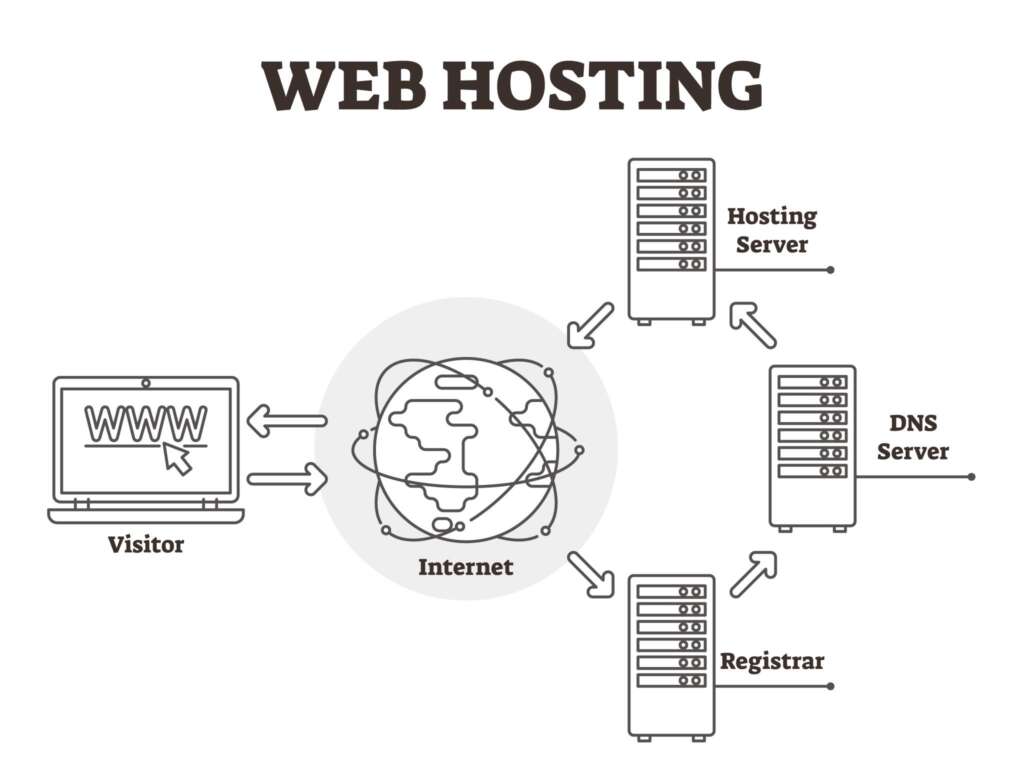
So what is web hosting? While your domain name serves as your unique internet address, web hosting is the actual physical home where all your website files, photos, code, and databases live!
Web hosting companies maintain ultra powerful, specialized computers called servers that stay connected to high speed internet 24 hours a day. When you purchase a plan, you are simply renting disk space and processing power on one of those servers to keep your site running smoothly.
Here is how Cache breaks down web hosting into three super simple steps!
- Renting Your Digital Room Buying a web hosting plan gives you a dedicated storage space on a secure, high powered server to store your entire website.
- Storing Your Website Files All your blog posts, images, custom code, and store products sit safely inside this server room, waiting for visitors to swing by.
- Delivering Content to Visitors Whenever someone enters your web address into their browser, your server instantly sends all your saved files straight to their screen so your site loads in a flash!
Pairing a reliable server with your domain name and web hosting package ensures your online space stays fast, safe, and ready for human friends anytime!
Choosing the right type of hosting depends entirely on your website traffic, budget, and technical needs. To help you pick the perfect fit for your new online space, Cache put together a quick comparison table breaking down the four main hosting options!
| Hosting Type | Ideal For | Key Benefit | Estimated Monthly Cost |
| Shared Hosting | Beginners, small blogs, portfolio sites | Highly affordable, beginner friendly | $2 to $10 per month |
| VPS Hosting | Growing business sites, medium traffic | Dedicated resource allocation | $20 to $80 per month |
| Cloud Hosting | E-commerce, scalable web applications | 99.99 percent uptime, flexible scaling | $10 to $100+ per month |
| Dedicated Hosting | High-traffic enterprise platforms | Maximum security and server control | $80 to $300+ per month |
Picking the right match for your domain name and web hosting plan ensures your website has all the speed, storage, and power it needs to thrive as your audience grows!
In shared hosting, dozens or even hundreds of websites all live together on a single physical server, sharing important resources like CPU power, RAM memory, and storage space. You can think of it like living in a cozy apartment building with lots of roommates!
- Pros: It is super cost effective and completely managed by your hosting provider, making it perfect for beginners who want an easy setup.
- Cons: Website performance can sometimes slow down if a neighbor website on the same server gets a sudden, massive wave of traffic.ssive traffic spike.
Even with those small traffic bumps, shared hosting remains one of the most popular starter options when setting up your domain name and web hosting package!
2. Virtual Private Server (VPS) Hosting
Virtual Private Server hosting, or VPS hosting, uses clever virtualization technology to split a single physical server into private virtual compartments. Think of it like upgrading from a shared apartment to your very own condo unit, where you get your own private rooms and walls!
- Pros: You get guaranteed server resources like dedicated RAM and CPU power that neighbor websites cannot touch or slow down.
- Cons: It requires a bit of moderate technical knowledge to configure and manage your server settings properly.
Upgrading to a VPS is an awesome next step for growing websites that need extra horsepower for their domain name and web hosting setup!
3. Cloud Hosting
Cloud hosting works by using an entire interconnected network of virtual servers instead of just one single machine. If one server experiences a hardware glitch or gets overwhelmed with massive traffic, another server in the cloud network instantly steps in to keep your website running smoothly. Think of it like a relay team of super fast cats, where if one gets tired, another cat jumps right in without missing a single beat!
- Pros: You get unmatched uptime, instant resource scaling, and incredible reliability for your website.
- Cons: Pay as you go pricing models can sometimes vary from month to month depending on how much traffic you get.metimes vary month-to-month.
For busy online stores and growing platforms, cloud hosting provides a super reliable foundation that pairs perfectly with your domain name and web hosting strategy!
4. Dedicated Server Hosting
Dedicated server hosting provides an entire physical server reserved exclusively for your website. Think of it like renting a whole private mansion all to yourself, where you do not have to share a single room, hallway, or resource with anyone else!
- Pros: You get complete root access, lightning fast loading speeds, and ultimate hardware security for your online business.
- Cons: It comes with a higher monthly price tag and requires professional system administration skills to manage everything smoothly.
While it is definitely an investment, dedicated hosting is the ultimate power move for high traffic websites that want complete control over their domain name and web hosting environment!
Understanding Control Panels (cPanel)
Managing a web server directly through complicated command line code can feel intimidating for non-technical human friends. That is where a hosting control panel like cPanel jumps in to save the day! It provides a simple, visual, web-based dashboard where you can easily manage your entire hosting environment with just a few clicks.
Here are four awesome things you can do using your cPanel dashboard:
- You can instantly launch popular content management systems like WordPress with a single click without touching a single line of code.
- You can easily set up professional custom email accounts for your business, such as contact@yourdomain.com.
- You can organize directories, upload fresh photos, and manage website files directly through the built in File Manager.
- You can protect your website data with automated full site backups and easily manage your MySQL databases.
Having an intuitive dashboard linked to your domain name and web hosting account makes managing your online home completely stress-free!
How Domain Names and Web Hosting Work Together
To put a functional website online, your domain name must point directly to your web hosting server using nameservers.
When you buy hosting, your provider gives you unique nameserver addresses likens1.hostingprovider.com and ns2.hostingprovider.com. By pasting these nameservers into your domain settings, you tell the global internet to send anyone who types your address straight to your domain name and web hosting server files.
Should You Buy Domain and Hosting from the Same Company?
Should you buy your domain name and web hosting from the same company or keep them separate? Here is how Cache breaks down your two options!
- Purchasing Together: Buying both from a single provider like Bluehost or Hostinger offers super convenient single dashboard account management and automatic DNS configuration without any extra setup steps.
- Purchasing Separately: Buying your domain from a specialized registrar like Namecheap or Cloudflare and hosting from a dedicated provider gives you greater control, tighter security, and easier migration paths if you decide to change hosts later.
Both choices work great, so pick whichever path fits your comfort level and budget as you launch your domain name and web hosting setup!
Final Thoughts
Building a website does not have to be complicated once you master the essentials! Here is how Cache sums up the entire process to get your new site live:
- Secure a Domain Name: Choose a short, memorable name that represents your brand, ideally with a trusted extension like .com.
- Select a Web Hosting Plan: Pick a reliable hosting option—such as shared hosting for beginners or cloud hosting for growing traffic—that fits your budget and goals.
- Connect the Two via DNS: Point your domain nameservers to your hosting provider, install your content management system like WordPress, and start building!
Once your domain name and web hosting are set up and connected, your brand new online home is officially open to welcome human friends from all over the world!
